• Hi all and welcome to TheWoodHaven2 brought into the 21st Century, kicking and screaming! We all have Alasdair to thank for the vast bulk of the heavy lifting to get us here, no more so than me because he's taken away a huge burden of responsibility from my shoulders and brought us to this new shiny home, with all your previous content (hopefully) still intact! Please peruse and feed back. There is still plenty to do, like changing the colour scheme, adding the banner graphic, tweaking the odd setting here and there so I have added a new thread in the 'Technical Issues, Bugs and Feature Requests' forum for you to add any issues you find, any missing settings or just anything you'd like to see added/removed from the feature set that Xenforo offers. We will get to everything over the coming weeks so please be patient, but add anything at all to the thread I mention above and we promise to get to them over the next few days/weeks/months. In the meantime, please enjoy!

Intersect faces question

RogerS

Moderator
Staff member
Joined
Jul 21, 2014
Messages
15,569
Reaction score
1,293
Location
Somerset
I'm trying to model this roof...or something similar

orangerie project.png

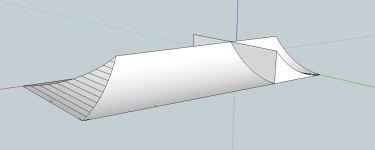
I created this SketchUp model and tried Intersect Faces but that didn't seem to work.
orangerie roof.png

So I've been selecting everything and then gradually deleting lines. But now I'm stuck with those horizontal lines which if I delete one, it loses the face.
 
Not sure how to resolve your current issue, but I just had a look back over your previous pos on a pagoda roof and copied my process.

Create an arc in one axis. Join its two back sides together!!

Push/pull to a usable length.

Create a copy.

Rotate it 90.

Move them together as a corner.

Intersect them.


Delete the parts outside the joined curve.

I then created a copy and flipped it using the scale command and joined them together.

I then selected everything and used the scale command to squish it downwards and this was the result.


Hope that helps if you want to start again.

If not, PM me your width length and height and I'll have a go and send you back the sky file. Can't promise anything as good as Dave R.
 
The curve shape you are using to intersect with is probably not a curve. It will be a number of segments that approximate a curve - that's just how sketchup works (I think).

What you can do is query the curve (or circle) when you first draw it and change the segment count to a high number. It adds more complexity to the drawing but gives you a smoother curve. Not tested it but a high segment count may not show the lines..
 
RogerS":31su7w8w said:
So I've been selecting everything and then gradually deleting lines. But now I'm stuck with those horizontal lines which if I delete one, it loses the face.

Roger, since you seem to have made decent progress going the way you are, just select all of the geometry, right click on it and select Soften/Smooth. That will soften those edges and get you what you are expecting.

Since SketchUp represents curved surfaces with a collection of smaller faces, the edges between the faces need to be there but softening them will make them not visible.
 
Thanks, chaps. I realise now that I couldn't have got as far as I did if Intersect hadn't worked!

One question though....what is the difference between Intersect with Selection and Intersect with Model ?
 
RogerS":skoba7ua said:
One question though....what is the difference between Intersect with Selection and Intersect with Model ?

Intersect with Model forces SketchUp to check through the entire model to see if the selected entity intersects with anything else. Intersect with Selection allows you to limit the entities SketchUp parse through to just those in the selection. This can have benefits and I use it more than Intersect with Model. It can speed up the process when there's a lot of geometry and it also allows me to control where intersections are made so I don't wind up with a bunch of unwanted intersections that I have to clean up later.
 
Back
Top