• Hi all and welcome to TheWoodHaven2 brought into the 21st Century, kicking and screaming! We all have Alasdair to thank for the vast bulk of the heavy lifting to get us here, no more so than me because he's taken away a huge burden of responsibility from my shoulders and brought us to this new shiny home, with all your previous content (hopefully) still intact! Please peruse and feed back. There is still plenty to do, like changing the colour scheme, adding the banner graphic, tweaking the odd setting here and there so I have added a new thread in the 'Technical Issues, Bugs and Feature Requests' forum for you to add any issues you find, any missing settings or just anything you'd like to see added/removed from the feature set that Xenforo offers. We will get to everything over the coming weeks so please be patient, but add anything at all to the thread I mention above and we promise to get to them over the next few days/weeks/months. In the meantime, please enjoy!

Video buffering.

Here’s more info than you need, but if you want to understand the recommendation to try Chrome, here you go:

Both Opera and Firefox are minority browsers. Chrome and Safari are the only mainstream browsers. Edge is Chrome with a moustache and glasses.
.........
I greatly appreciate the fulsome explanation, which was very interesting. I am reluctant to try Chrome because last year I spent some time trying to remove it entirely, and am not keen on going through that process again just for the sake of an experiment. I resent Google's hegemony, and their avoidance of local taxes, so I avoid using them as much as possible (and yes, I know that Google own Youtube). I remain a little sceptical that this could be a browser problem because every Firefox user would be on the internet whinging about Youtube if it was browser-related.
 
So... you don't have a graphics card. Intel 530 is a part of the main cpu chip. Not a problem for most normal use and certainly capable of playing 4k 60hz videos.

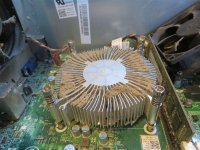
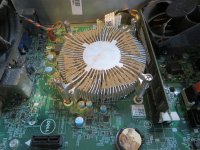
The fact that it isn't makes me think overheating. 2 likely causes - the fins on the cpu cooler are blocked with fluff or more likely one or more of the pegs that hold it onto the top of the cpu are broken. Open the case and check the cooler is secure and dust free. New cooler is not too expensive if pegs are broken.

btw... you can record some video on a phone then plug the phone into the computer and transfer the file to the drive for playback testing.

I shall get a screw-driver and have a little look. It's been years since I last cleaned it internally. However, fan noise hasn't been an issue, which is what I normally associate with a hot computer.
 
..... the fins on the cpu cooler are blocked with fluff or more likely one or more of the pegs that hold it onto the top of the cpu are broken.....

I took it apart, and it wasn't too bad at all:

IMG_7507.jpg

That's dust on the top, but virtually nothing between the fins. I cleaned the whole thing thoroughly, and Youtube still doesn't work properly. Thanks for the suggestion, and that's one fewer variable to worry about.
 

Attachments

  • IMG_7506.jpg
    IMG_7506.jpg
    230.8 KB · Views: 1
Mike - have you tried any other browsers apart from Firefox & Opera? I know you don't want to use Chrome (a sentiment I share), but it would probably be good to try something other than the ones you already have installed. There will be various things in your browser profiles that have appeared over the time you've used them and it's possible that there's something at fault there. Installing something different will guarantee a clean start.

Brave (an open-source browser that is heavily focused on privacy) and Vivaldi (a very customisable browser & what I use for anything non-financial) are both based on the "Chromium" webpage rendering engine that Chrome uses but neither are in Google's orbit.
 
I greatly appreciate the fulsome explanation, which was very interesting. I am reluctant to try Chrome because last year I spent some time trying to remove it entirely, and am not keen on going through that process again just for the sake of an experiment. I resent Google's hegemony, and their avoidance of local taxes, so I avoid using them as much as possible (and yes, I know that Google own Youtube). I remain a little sceptical that this could be a browser problem because every Firefox user would be on the internet whinging about Youtube if it was browser-related.
All good reasons for avoiding Google. I do see a number of Reddit threads with Firefox users complaining about YouTube not working, but given the number of users and all the different ways things can go wrong, it’s hard to know if these are significant. Those users do ascribe it to the Firefox-YouTube interaction as the same users report eg Safari-YouTube working reliably though.

When you get the spinner, can you tell if it is trying to load an ad or just continue playing the main video?
 
I too use Brave and Vivaldi (mostly the former) as it has built in ad blocking and a high level of privacy protection. You Tube runs fine on it, as do other video platforms. It gets updated frequently which is irritating but probably good. It is very easy to select shielding on a site by site basis and is very easy to change search engines. Also very easy to bookmark and categorise. Vivaldi is a prettier design.
 
OK so lets eliminate or confirm internet video as the problem.

Here is a video file straight from my camera. It is 4k 25fps MP4 Video and about 300MB. I have put it in a zip file so that your browser should download it and not play it. Unzip it (right click it extract) and see if it plays.

<deleted file so no link>

Its 21 seconds of a boat trip to see icebergs in Greenland back in august.
 
Last edited:
I took it apart, and it wasn't too bad at all:

Totally an aside to the buffering problem,
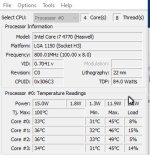
This little program is pretty good at indicating if processor cooling needs attention, amongst other things.

coretemp.jpg

Core Temp.exe, (Google it for your preferred download site).


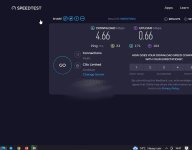
As far as Download speeds are concerned yours are way higher than minimum essential.

I'm posting this on a basic copper wired landline system whilst watching a Netflix internet download on TV with an active skype window open to Germany (on another laptop Wi-Fi feed) and have just tried simultaneous YouTube video, no buffering anywhere.

The speed that this PC is seeing is:-
download.jpg
 
All good reasons for avoiding Google. I do see a number of Reddit threads with Firefox users complaining about YouTube not working, but given the number of users and all the different ways things can go wrong, it’s hard to know if these are significant. Those users do ascribe it to the Firefox-YouTube interaction as the same users report eg Safari-YouTube working reliably though.

When you get the spinner, can you tell if it is trying to load an ad or just continue playing the main video?
It's not only when it's past the ads, but it happens multiple times. In other words, it can finally get going, run for say 30 seconds, and then start buffering again.
 
OK so lets eliminate or confirm internet video as the problem.

Here is a video file straight from my camera. It is 4k 25fps MP4 Video and about 300MB. I have put it in a zip file so that your browser should download it and not play it. Unzip it (right click it extract) and see if it plays.


Its 21 seconds of a boat trip to see icebergs in Greenland back in august.
It played perfectly, and immediately.
 
Mike - have you tried any other browsers apart from Firefox & Opera? I know you don't want to use Chrome (a sentiment I share), but it would probably be good to try something other than the ones you already have installed. There will be various things in your browser profiles that have appeared over the time you've used them and it's possible that there's something at fault there. Installing something different will guarantee a clean start.

Brave (an open-source browser that is heavily focused on privacy) and Vivaldi (a very customisable browser & what I use for anything non-financial) are both based on the "Chromium" webpage rendering engine that Chrome uses but neither are in Google's orbit.
I use Duckduckgo as my search engine (it's brilliant.......far better than Google in my experience), and they advertise their web browser now and then. Do you know anything of it? Is it worth trying?
 
It's probably quite important to say this: I have found that Facebook isn't working properly for me any more, and I have just visited Tuff Saws site, and could get any page other than their homepage to load. Ian (Tuffsaws) even sent me a direct link to the blades I am after, and I couldn't get that to open. So the problem is clearly wider that just video buffering........although I have no issues at all with any of the other websites I use, including this one, and my email provider.
 
The snag with Ducky I find is that it is hopeless for shopping. Frequently I do specialist book and ingredient searches and other search engines turn up far more results.

Mike, are you confident that you have not picked up some malware?
 
The snag with Ducky I find is that it is hopeless for shopping. Frequently I do specialist book and ingredient searches and other search engines turn up far more results.

Mike, are you confident that you have not picked up some malware?
I have run Malwarebytes and Avast (which checks for malware as well as viruses) scans. My confidence is limited by the fact that I have no knowledge of this area at all, so have done only what I know to do, but have no idea whether it is any good.
 
Last edited:
I use Duckduckgo as my search engine (it's brilliant.......far better than Google in my experience), and they advertise their web browser now and then. Do you know anything of it? Is it worth trying?
Sorry, no. I've never tried it. Like you, I also rate the search engine (although I don't think I'll ever retrain my brain to refer to web searching as anything other than "googling", regardless of engine used!), but I'm quite happy with that being separate to the browser.

At the risk of suggesting more use of google, it might be worth changing your DNS settings to use the google DNS server (8.8.8.8) rather than the ISP-provided one. That will rule out anything odd with the way your computer is looking up web addresses (usually via your ISP). If DNS doesn't work then some webpages will work (as their addresses will be cached) but others won't. I'm sure you can "duckduckgo" (see, it just sounds wrong) how to change the DNS.

I think it's unlikely to help, but it is probably worth testing if only to rule out DNS issues.
 
Sorry, no. I've never tried it. Like you, I also rate the search engine (although I don't think I'll ever retrain my brain to refer to web searching as anything other than "googling", regardless of engine used!), but I'm quite happy with that being separate to the browser.

At the risk of suggesting more use of google, it might be worth changing your DNS settings to use the google DNS server (8.8.8.8) rather than the ISP-provided one. That will rule out anything odd with the way your computer is looking up web addresses (usually via your ISP). If DNS doesn't work then some webpages will work (as their addresses will be cached) but others won't. I'm sure you can "duckduckgo" (see, it just sounds wrong) how to change the DNS.

I think it's unlikely to help, but it is probably worth testing if only to rule out DNS issues.
Well, the constrained limits of my computer knowledge were completely exposed by your second paragraph. I have no idea what DNS is, and what the implications are of changing it. I would have to look up how to change it, as you suggest.
 
I have run Malwarebytes and Avast (which checks for malware as well as viruses) scans. My confidence is limited by the fact that I have no knowledge of this area at all, so have done only what I know to do, but have no idea whether it is any good.
I have just run another Malwarebytes scan, which came back clear.
 
Well, the constrained limits of my computer knowledge were completely exposed by your second paragraph. I have no idea what DNS is, and what the implications are of changing it. I would have to look up how to change it, as you suggest.
Websites are held on servers, which have addresses which (ignoring newfangled stuff) have addresses that might look a bit like 216.24.57.252. If you try to go to (say) https://www.cgtk.co.uk, your computer asks a DNS server what the address of "www.cgtk.co.uk" is and (hopefully) it replies with 216.24.57.252. Your computer then sends a message (using a protocol called https) to that address to get the web page.

If DNS doesn't work, your computer doesn't know where to send the requests to and hence websites don't work.

Google's DNS server is very reliable.

Here you go: https://www.whatismyip.com/google-dns/
 
Well, this is proving tricky. As well as Dr Al's DNS advice...
Have you checked that your internet driver software is up to date? (check version vs what your wife is using)
Are you using 2.4 or 5 GHz band - try switching
Have you added or updated software recently that could be causing a conflict?
Have you ruled out wi-fi issues by using ethernet cable?
Have you tried "forgetting" the wi-fi and doing a restart?
Have you restarted the router (waiting at least 30secs for re-start)?
Have you done the usual ping tests?
How old is the PC?
 
Changing DNS server is often a really useful diagnostic test and it’s easy enough to change it back when you’re done. Be aware that it will give Google the list of sites you visit using any browser and any app on that machine while using Google DNS, so it’ll give Google a different set of data about you compared to using their browser.
 
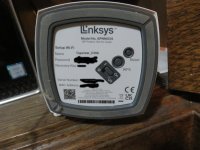
I've fallen over at the first hurdle in my attempt to alter the DNS settings. I can't get past the router password question when trying to get onto the appropriate Linksys page. I used the password from the router, which I know works as it's what we give to all visitors who want wifi.........and 4 times it told me I was wrong. The fifth failed attempt would lock me out permanently, so I didn't do it.
 
I’d recommend changing the DNS entry only on the machine with the problem, not on the router since most of the machines in your household seem to be working OK?

Routers typically have an admin password that’s separate from the password used to join your device to the WiFi network. You can often find this password written on the back of the router box - sometimes it’s on a plastic card that can be detached from the router.
 
Is it not your hub manager password you need Mike which is different from your wifi password. Mine is a BT router so different but the password is also shown on the slide out card on the router where your wifi password is. I'm sure some of mine in the past were left blank with just ADMIN already in the user box.

EDIT
Beaten to it. :ROFLMAO:

Have you tried updating your drivers Mike?
 
I’d recommend changing the DNS entry only on the machine with the problem, not on the router since most of the machines in your household seem to be working OK?

Routers typically have an admin password that’s separate from the password used to join your device to the WiFi network. You can often find this password written on the back of the router box - sometimes it’s on a plastic card that can be detached from the router.
I have literally no idea at all where to start. You're saying Not the router........but then you're talking about the password written on the router box. I'm confused. These are the only choices on my router:
 

Attachments

  • IMG_7420a.JPG
    IMG_7420a.JPG
    174.3 KB · Views: 9
Last edited:
Your router Mike will usually have two passwords. The one you hand out to visitors is just the wifi password. There will be another one that allows you access to the administrator settings of the router itself. Don't mess about with these at the moment as it is helpful that Lorraine can still get access with her laptop.
 
Updating drivers is simple and can often fix hardware that's misbehaving. If you google / duckdoo "update drivers for win 10" you'll find loads of articles and videos. Do it for free not a site that offers for a fee.

Do you know the make and model of your PC? If so go to their website, look for support and type in the details. You may be able to update automatically from there or download them to your desktop then you just click on them and let it do it's work wi=hich often includes restarting the machine.
You're a wizz with Autocad, you'll find this very simple

If you can find the make and model, post it and we can do a search for you.
 
I have literally no idea at all where to start. You're saying Not the router........but then you're talking about the password written on the router box. I'm confused. These are the only choices on my router:
Sorry Mike. Two unrelated paragraphs. Follow the instructions for updating DNS in Windows 10 that Adrian linked. Don’t change the settings in your router (which means you don’t need the admin password for the router).

Make a note or take a screenshot of the original settings before you change them just in case.
 
Do you have a mobile phone that has cellular data? i.e. internet when you are out and about? And does it work at home if you have no wifi?

If so use the phone to make a wifi 'hot spot' (settings- connections- mobile hot spot- usually). Then connect your PC wifi to this new wifi from the phone. Try a video. If it works the problem is your ISP, if it doesn't it is your PC that has a problem and we can work on that.
 
I think Mike is not a fan of smart phones that typically have hot spot capability. Good idea though.
 
You have Intel chip and Graphics. Do you have 'Intel Driver and Support assistant' as a program on your start menu? If not download it from intel (search the name) and run it. It will check your system and tell you if you have out dated drivers for video and possibly wifi too if that is intel.

And of course before you go too far you do have a recent full system backup don't you?
 
You have Intel chip and Graphics. Do you have 'Intel Driver and Support assistant' as a program on your start menu? If not download it from intel (search the name) and run it. It will check your system and tell you if you have out dated drivers for video and possibly wifi too if that is intel.

And of course before you go too far you do have a recent full system backup don't you?
I backed up all my folders last week.

I downloaded and ran the Intel Driver & Support Assistant:

Screenshot 2024-10-09 at 07-09-00 Intel® Driver & Support Assistant.png

For good measure, I also downloaded and ran the Intel Processor Dignostic Tool, and everything passed.
 
I had no idea such a thing was possible......which obviously means I have no idea how to do it!

-

As an aside, I have also found that Facebook isn't running properly. It isn't something I go on often, so I've only just noticed.
It puts your computer back to a previous version before any alterations or updates were done. Any info stored is perfectly safe. You just have to type in system restore in the search.

I think win10 does a 'refresh' also. This does a reinstallation of the operating sytem. Probably best to have your stuff backed up.
 
Do you have a mobile phone that has cellular data? i.e. internet when you are out and about? And does it work at home if you have no wifi?

If so use the phone to make a wifi 'hot spot' (settings- connections- mobile hot spot- usually). Then connect your PC wifi to this new wifi from the phone. Try a video. If it works the problem is your ISP, if it doesn't it is your PC that has a problem and we can work on that.
I choose not to have a mobile, Robert.
 
Sorry Mike. Two unrelated paragraphs. Follow the instructions for updating DNS in Windows 10 that Adrian linked. Don’t change the settings in your router (which means you don’t need the admin password for the router).

Make a note or take a screenshot of the original settings before you change them just in case.

Yes, do this. Messing around with router settings is a lot of unnecessary faff compared to just tweaking the settings for one PC.
 
The PC is close to the router, but connected wirelessly, yes? Lorraine's laptop works fine so it's not a Virgin problem. Just to eliminate any issue with your wireless card, I would plug the computer into the router with an ethernet cable. One is usually supplied with the router. Turn the wi fi off on the PC.
I've just tried this, and it made no difference.
 
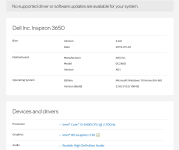
If you can find the make and model, post it and we can do a search for you.
Device name DESKTOP-NF41SU2
Processor Intel(R) Core(TM) i5-6400 CPU @ 2.70GHz 2.71 GHz
Installed RAM 8.00 GB
Device ID 9EFA2212-8500-4F12-B595-5D76452F5A34
Product ID 00325-80539-66881-AAOEM
System type 64-bit operating system, x64-based processor
Pen and touch No pen or touch input is available for this display
 
Back
Top