• Hi all and welcome to TheWoodHaven2 brought into the 21st Century, kicking and screaming! We all have Alasdair to thank for the vast bulk of the heavy lifting to get us here, no more so than me because he's taken away a huge burden of responsibility from my shoulders and brought us to this new shiny home, with all your previous content (hopefully) still intact! Please peruse and feed back. There is still plenty to do, like changing the colour scheme, adding the banner graphic, tweaking the odd setting here and there so I have added a new thread in the 'Technical Issues, Bugs and Feature Requests' forum for you to add any issues you find, any missing settings or just anything you'd like to see added/removed from the feature set that Xenforo offers. We will get to everything over the coming weeks so please be patient, but add anything at all to the thread I mention above and we promise to get to them over the next few days/weeks/months. In the meantime, please enjoy!

Email query

Doug

Old Oak
Joined
Jul 21, 2014
Messages
2,418
Reaction score
426
Location
@dougsworkshop
In the early hours of this morning I received an email supposedly from a customer containing a link to what was some sort of money making scam.

My concern isn't the scam but the fact that although the customers name & phone numbers are in my Apple contacts her email address isn't yet the email displayed her name as the sender?

I've spoken to her on the phone & the email address although containing her name isn't one she has ever had, so is it my contacts list that has been accessed or hers?

Is this something I should be worried about & take some sort of action?

Any assistance gratefully received.

Doug.
 
This is quite a common scheme used by spammers. The idea is that they use names you are likely to recognise and so more likely to be opened by the recipient.

Your address book might not be compromised but they possibly have one from your customer containing your addy.

There is nothing much you can to by way of address filtering as you don't want to block the first half of the address and you have no idea what the latter half of the address will be as they keep changing that.

Usually a content filter will catch them as the mails tend to be "hello Doug" followed by a URL and not much else.

hth
Bob
 
Probably neither. They harvest emails from all over the place.

Doug - do you use SpamSieve in your Apple Mail ? It's very good.
 
Thanks for the replies.
I think I found it strange as I don't have her email address & I wasn't aware she had mine plus it's been 2 years since I last did any work for her.

I don't use Spam sieve Rog, to be honest if I get 10 emails a day that's quite a lot & whilst most get deleted without opening they are from companies I'm happy to receive emails from.
 
Out of curiosity, do you use Rules at all in Mail? Probably not if you get so few daily emails. But surely you get more than that....forum notifications etc ?
 
I've had odd emails from unknown sources at times- don't think its lead to anything serious but always changed my passwords as a precaution.

Rod
 
RogerS":31j2hj6p said:
Out of curiosity, do you use Rules at all in Mail? Probably not if you get so few daily emails. But surely you get more than that....forum notifications etc ?

Not sure what's Rules is Roger
What forum notifications? I get an email if someone PM's me but that's pretty rare.
 
Doug":ezi1gtez said:
RogerS":ezi1gtez said:
Out of curiosity, do you use Rules at all in Mail? Probably not if you get so few daily emails. But surely you get more than that....forum notifications etc ?

Not sure what's Rules is Roger
What forum notifications? I get an email if someone PM's me but that's pretty rare.

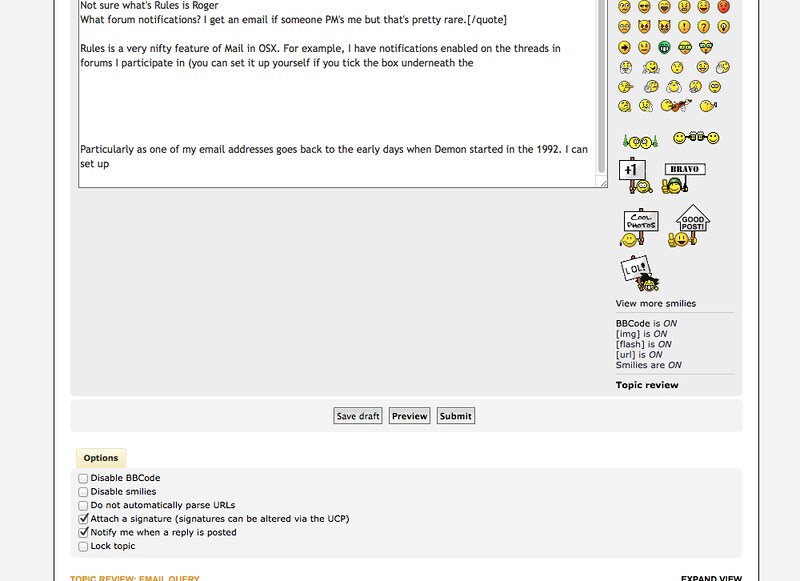
Rules is a very nifty feature of Mail in OSX. For example, I have notifications enabled on the threads in forums I participate in (you can set it up yourself if you tick the box as below)


So I create folders in Mail, (for example, TheWoodhaven, UKW) and then create a rule that automatically puts the notification email in the relevant folder. Other folders I have set up are Woodworking and under that another level of folders - Axminster, Wealden, etc and corresponding rules. So over time I have a complete reference of all my orders or dealings with them and because it's on the computer easily searchable.

Ditto one for eBay etc.

So whenever I sit down at the computer, triage has already taken place. I can quickly scan down to look at the number of emails in the various folders and take action or leave for another time. But my main email Inbox is now left with new stuff that probably does need an action. Saves me having to wade through a load of generic emails.

So in the morning or whenever I log on to the computer I can quickly scan down my list of folders

Another advantage, particularly as one of my email addresses goes back to the early days when Demon started in the 1992, is that I can set up rules to automatically delete emails from some sources.
 
Back
Top