• Hi all and welcome to TheWoodHaven2 brought into the 21st Century, kicking and screaming! We all have Alasdair to thank for the vast bulk of the heavy lifting to get us here, no more so than me because he's taken away a huge burden of responsibility from my shoulders and brought us to this new shiny home, with all your previous content (hopefully) still intact! Please peruse and feed back. There is still plenty to do, like changing the colour scheme, adding the banner graphic, tweaking the odd setting here and there so I have added a new thread in the 'Technical Issues, Bugs and Feature Requests' forum for you to add any issues you find, any missing settings or just anything you'd like to see added/removed from the feature set that Xenforo offers. We will get to everything over the coming weeks so please be patient, but add anything at all to the thread I mention above and we promise to get to them over the next few days/weeks/months. In the meantime, please enjoy!

From Prusa to Bambu

Dr.Al

Old Oak
Joined
Dec 31, 2020
Messages
3,535
Reaction score
2,212
Location
Dursley, Gloucestershire
Name
Al
If you're not at all interested in 3D printing, now might be a time to go and read a different thread. However, I thought some might be interested in how the transition between manufacturers goes for me.
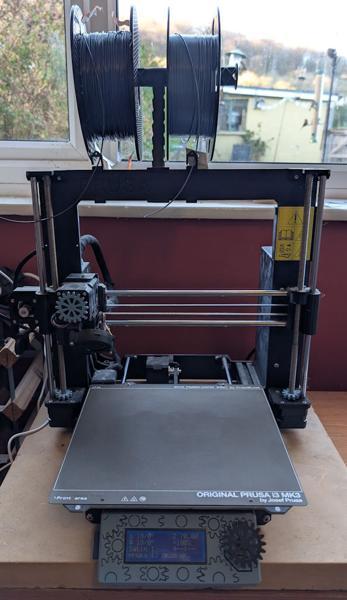
2025-11-18-01-prusa_600.jpg


As anyone who has followed any of my build write-ups will have realised, I get a lot of use out of my 3D printer (5300 hours of printing time so far according to the statistics screen). It still astonishes me how many different things become just a little bit easier because I can quickly design and 3D-print a little widget / jig / wall mount / marking gauge or whatever. I've had the 3D printer for a few years now and I've been thinking for a while about upgrading to a newer / better one. I few months ago I mentioned this to my other half and she said "well, you can certainly justify it given how much you use it". I'm not sure I can really justify it, but not wanting to argue, I nevertheless decided to buy a new one when the Black Friday sales came round.
2025-11-18-02-filled-bed_600.jpg


The essential things I was looking for in a new printer were (in rough order of priority):
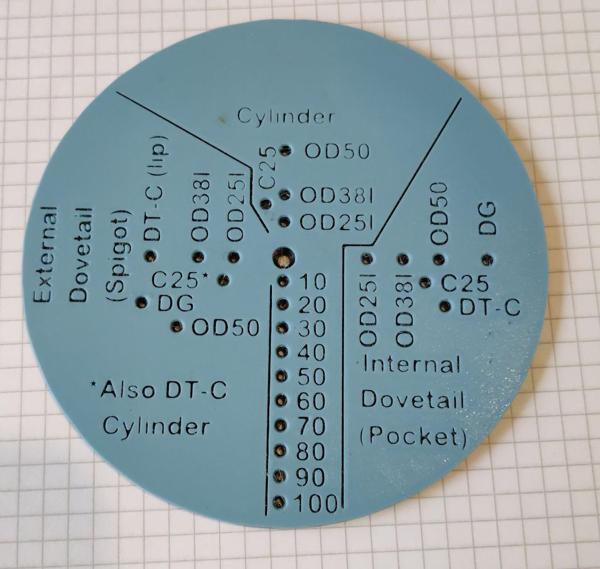
  1. Bigger print area. I'm deliberately saying "area" rather than "volume" as I regularly hit the XY size limit of the printer (and have to print parts in multiple pieces) whereas I don't think I've ever hit the Z size limit of the printer.
  2. Not too much bigger overall printer size. The printer lives in the dining room and there isn't that much room for a substantially bigger printer (in particular, the Prusa Core XL is far too deep for the space available).
  3. Faster print speed. Newer generation printers seem to run a lot quicker than the older ones (according to some CAD models I tried in Prusaslicer, the Core One is about twice the speed of my Mk3s+ - I generally trust the Prusaslicer time predictions so this seems a fair comparison).
  4. Automatic first layer calibration. First layer calibration isn't something that has to be done often: mainly when changing nozzles, but it's tedious and time consuming (to the point that I avoid changing nozzles unless absolutely necessary) and it would be great to never have to worry about it again. A lot of the newer printers do first layer calibration automatically, so I considered that an essential requirement.
  5. An enclosure and extractor fan to make it practical to print some more exotic materials like ABS/ASA. This could be retrofitted onto any printer (including my current one), but an integrated one tends to mean a smaller overall size. The enclosure shouldn't have any negative effect on printing PETG (i.e. I still want to be able to do this with the enclosure's door shut).
  6. The slicer must support STEP files (most do) as I really don't want to go back to the dark ages of STL files.

2025-11-18-03-multi-colour_600.jpg


A few nice-to-haves but non-essentials I was hoping for were:
  1. Automatic filament changing. This provides two main features: multi-colour printing (mainly for labels on the top of a part) and also ideally for dealing with the end of a roll of filament (i.e. just switch to the next roll of the same filament when one runs out rather than waiting for me to come and manually swap). There have been a few times when I've left a print running overnight expecting it to be finished in the morning but when I've come downstairs I've found it still had several hours to go as it had run out of filament.
  2. The ability to print more easily removable supports of some sort (either PVA or some type of transition filament). I do my best to avoid supports whenever possible, but being able to use easily removable supports would offer some more design freedom.
  3. Built-in network support would be nice (to save the faff involved with setting up a Raspberry Pi with Octoprint). No big deal if not though as Octopi works well.
  4. Multiple extruders, especially if they can be used with different nozzles sizes (e.g. print most of the object with a 0.4 mm nozzle and then add a layer of embossed text with a 0.2 mm nozzle and a different colour filament).

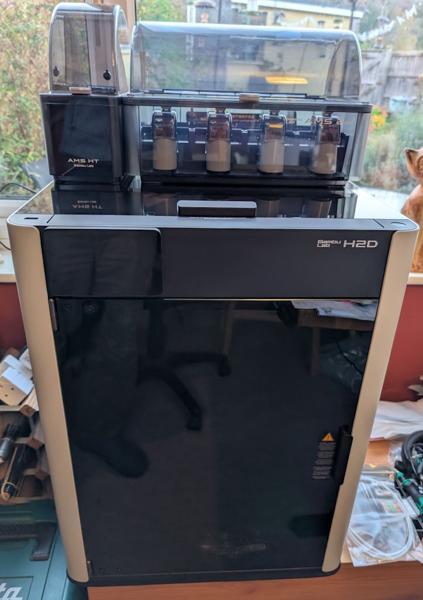
After a lot of wavering back and forth between the Prusa line-up and the Bambu one, I settled on this rather expensive beast:
2025-11-18-04-h2d_600.jpg


I definitely had a strong leaning towards Prusa as I like the fact they're made in Europe, that their support is second-to-none (even long after warranties have expired) and that they provide upgrade paths to convert an older printer into a newer one. I came very close to opting for the Prusa Core One or Core L (either which would have been a lot cheaper than the H2D!) and if the overall size of the Prusa Core XL had been just a little bit smaller overall I think it would have won the battle. However, this machine is quite a bit more capable in a lot of ways than the Core One and (with the exception of the build area) the Core XL.

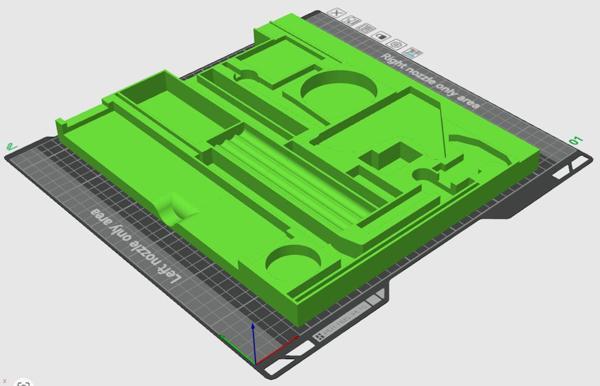
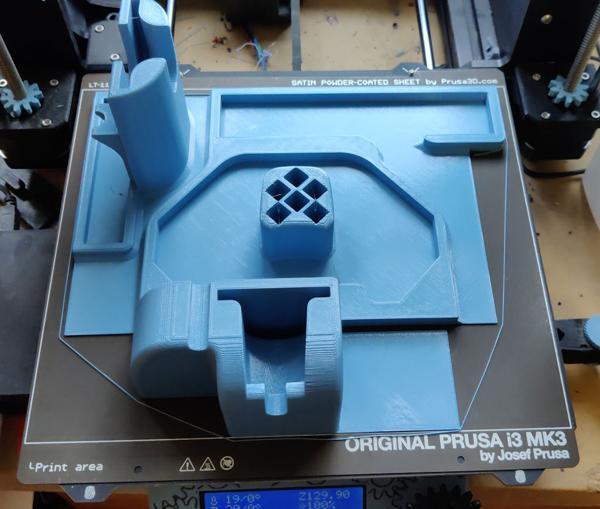
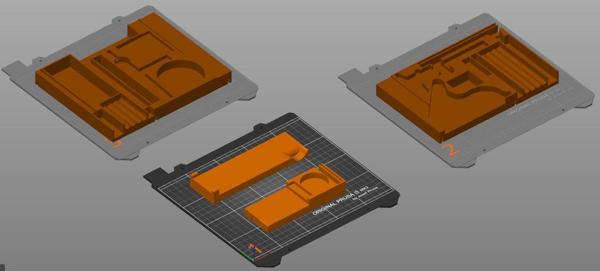
An example of the benefit to me of the bigger build area is the drawer liners for my travel tool chest. This is what a print would look like sliced for the Prusa (spread over three separate prints):
2025-11-18-05-prusa-multi-bed_600.jpg


Here it is on the H2D:

2025-11-18-06-h2d-single-bed_600.jpg


Of those ten criteria above, the only one it doesn't really meet is the multiple extruders one, despite having multiple extruders! It has two extruders (which will be useful for support material or mixed TPU/PETG prints), but it doesn't support having different nozzle sizes on the two extruders. Hopefully that will be resolved with a firmware update at some point in the future, but there are no guarantees.

It's early days yet, but there are a few negatives I've found so far.
2025-11-18-07-calibration-error_600.jpg


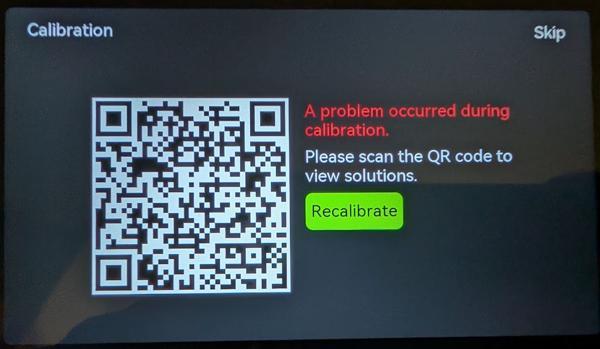
The first was a disappointing set-up "experience". I carefully followed the un-boxing instructions in the booklet that came with the printer, but neither it (nor the un-boxing video on their website) mentioned one little bit of foam tucked away at the back of the printer behind the nozzles. I didn't notice it (it was only visible from some angles) and it resulted in the initial calibration failing. The error message was just a generic "calibration failed" one with a QR code that took you to a generic web page with no information about that error. I tried contacting support but got a message saying the response would take 2-3 days so I tried deciphering the QR code and doing a web search for the error code embedded in the URL (the error code disappears when you follow the link as it forwards you to another page, but you can find it with a barcode scanner). That brought up a forum where someone was having nozzle problems, so I had a look around the nozzle area and found the foam.

When I had problems with the Prusa printer, I used the live chat on their website (which is available 24/7) and got help almost immediately.

More to follow...
 
My son is into his 3D printing and he recently got the cheapest Bambu Labs printer (A1?) (with AMS) and thinks it's brilliant. It certainly seems to work very fast and produces very neat prints. The software all looks great too.

He's doing a placement year at Bosch and they have a few printers including a Bambu Labs one which he thinks is the best of the lot. He's trying to convince them to get another one.

I'm sure you won't be disappointed.
 
My son is into his 3D printing and he recently got the cheapest Bambu Labs printer (A1?) (with AMS) and thinks it's brilliant. It certainly seems to work very fast and produces very neat prints. The software all looks great too.

He's doing a placement year at Bosch and they have a few printers including a Bambu Labs one which he thinks is the best of the lot. He's trying to convince them to get another one.

I'm sure you won't be disappointed.

Thanks Nick. I'm sure you're right. There are definitely some things that aren't as good as the old Prusa, but in a lot of ways the new one is going to far outstrip it (especially in speed). I was spoiled with the customer service from Prusa; hopefully I won't need to contact Bambu much (although there are still some bits of the order that haven't been sent so I'm hoping they get back to me about the missing stuff soon).
 
My son is ............................ doing a placement year at Bosch and they have a few printers including a Bambu Labs one which he thinks is the best of the lot. He's trying to convince them to get another one.
..
I'm surprised Bosch use equipment using Bambu Lab printers connect to their (BL) cloud service, which is hosted in China if using default WiFi.
 
Last edited:
I'm surprised Bosch use equipment using Bambu Lab printers connect to their cloud service, which is hosted in China if using default WiFi.
You can turn off the cloud service and do a "LAN only" mode that (at least allegedly) stops stuff leaving the local network. I'd guess (hope?) that Bosch have used that option.

I haven't yet, but in due course I will enable it and will probably also enable "Development Mode"; more on that in a later post in this thread.

However, I'm not going to do anything like that until I've got everything from Bambu and have confirmed its working. They still haven't shipped part of the printer; the missing part is described on a help page as "usually shipped separately from the printer", but the order page shows "Delivered" with no outstanding items. I tried contacting them about it a couple of days ago but as yet no reply.
 
Hope Bambu support get their finger out long response times can be frustrating.

I gather some companies even baulk at the need for chinese connections for updates because of risk to company Intellectual property.

As an aside:
If a development company uses a cloud service, is the end product considered already in the public domain in regards to trying to obtain or prove a patent.
 
This is an interesting topic, thanks for posting. I have watched you builds with interest and marvelled at the use of 3D printed items. i have thought about dipping a toe into the 3D printing world but looks like I will need to learn another language too. Bambu Labs seem to have either a very good name for being easy and intuitive to use or they have a very good marketing dept.
 
I have read lots of people recommending Bambu and I think I'll be glad to have gone with it. However, I'm also pleased I went with Prusa for my first printer (not that Bambu was available back then).

I bought the kit version of the Prusa, which (as the name suggests) comes in bits. It came with a really detailed instruction manual with very clear pictures and explanations. Building it taught me all the different bits of the printer and helped me understand what went into it.

However, the main reason I'm pleased I went with the Prusa was that there were one or two things I didn't understand and needed help with. 24/7 live technical support chat with someone who understands the product in detail was really useful! It feels even more beneficial as I compare it to Bambu's radio silence.
 
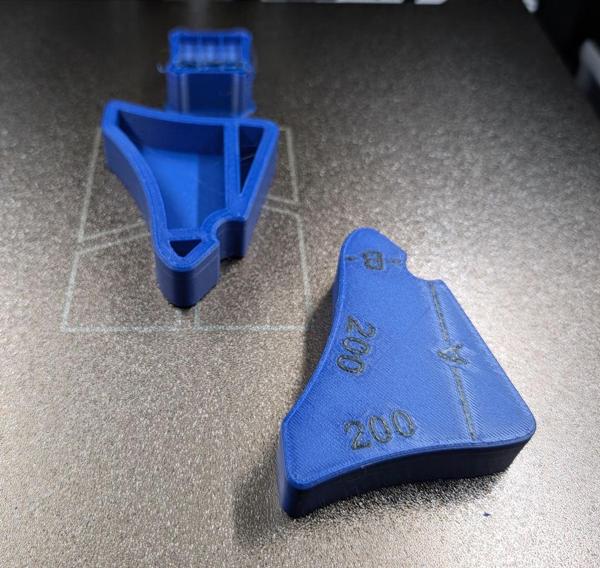
These are the first things I printed on the H2D:

2025-11-18-08-first-print-on-bed_600.jpg


They are slightly pointless prints if I'm honest; I'd already printed one (in monochrome) on the Prusa. However, it seemed like a good test of a few different things and it was a relatively quick thing to start with.

Speed wise, it was very good. It took a long time to get started: it runs lots of "pre-flight" checks for things like bed levelling, vibration compensation and nozzle offsets. That takes nearly 10 minutes! I've done some prints in the past for which the entire print took less than 10 minutes; however, most are multiple hours and hence the 10 minute warm-up is largely irrelevant. Once it got going, the speed was excellent: the Prusa took 2 hours to print one of those pieces; the H2D took 2 hours to print both.

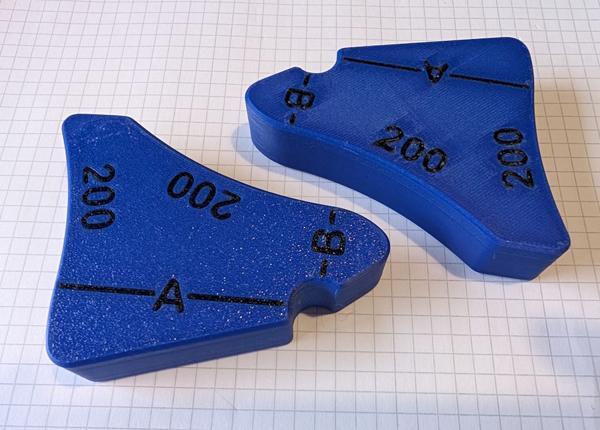
The reason I printed two of them was that it gave me a chance to try printing in two different orientations. One is face down (the way I printed it on the Prusa), the other is face up. The face-up one needed supports (which was partly why I did it - as a test of support printing). This is what the two of them look like in the same orientation:

2025-11-18-09-first-print-on-desk_600.jpg


The one on the left was face down and has a bit of a speckled texture from the bed; the other was face up and doesn't look great but at least is smooth.

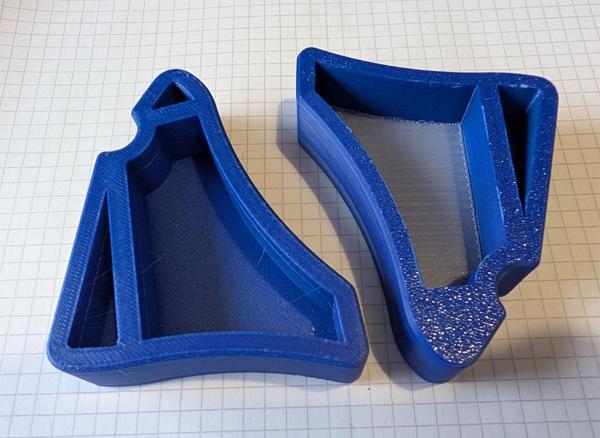
2025-11-18-10-underside_600.jpg


For the supports I used some "Support for PETG/PLA" from Bambu that is used as an interface material between the support and the print. The idea is that it doesn't stick especially well to the print and you can easily pull the supports away from the print. In practice, digging the supports out was quite a chore and, as you can see from the photo above, it left the layer of support interface material on the print. That's not a problem for something like this, but it could be annoying on other parts.

I've read that PLA can be used as an interface material for PETG, so I'll try that at some point. I've also got some PVA, which can be used as a support and then removed with warm water. That's a more expensive option, but it'll be good to try.

2025-11-19-02-top-surfaces-similar_600.jpg


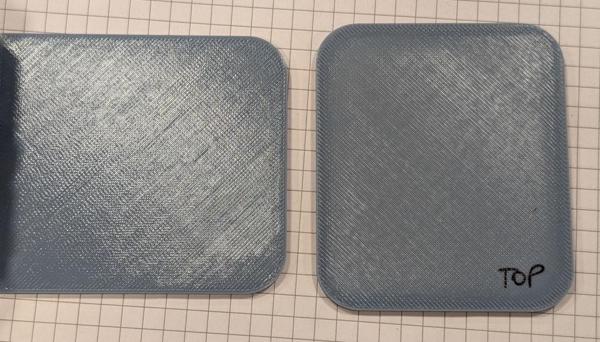
This photo shows a comparison of the top surface of two parts printed in the same filament. The one on the left was printed on the Prusa; the one on the right on the H2D. The finish is fairly similar (any difference in the image is just lighting).

2025-11-19-01-prusa-satin-vs-bambu-textured_600.jpg


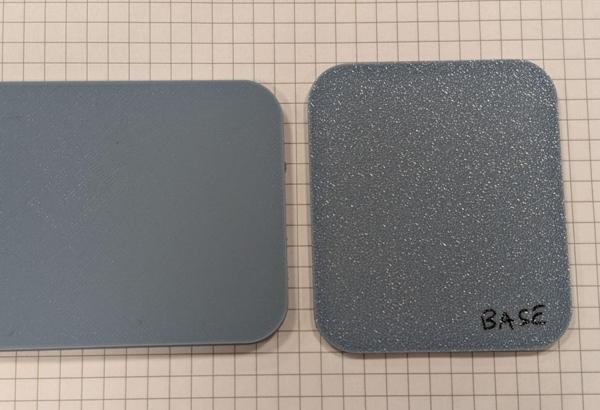
This photo shows a comparison of the bottom surface of two parts printed in the same filament. The one on the left was printed on the Prusa (using the "Satin" build plate that I always used); the one on the right on the H2D. I much, much prefer the finish from the Prusa plate.

Bambu offer two different build plates for the H2D. The other option (which I don't have) is called a "smooth PEI plate". I expect that will leave a better finish on the part, but it requires the tedious extra step of applying glue to the plate before printing PETG. That seems like a big downside to me compared to what I'm used to with the Prusa.

On a semi-positive note, it looks like there are after-market build plates with a satin finish and they look like they might be similar to the Prusa one. However, it's made and sold in America and the shipping to the UK is extortionate (especially considering there's also a note to say that import duties may be added as well). This might have to go on the wish list and I'll think about it if I ever happen to visit the USA, although I doubt that'll happen any time soon.
 
2025-11-18-11-second-print_600.jpg


This was my second print and it highlights the speed benefit of the new printer quite well. This would have taken 24 hours on the Prusa (and if I wanted it with coloured text I would have had to do two manual colour changes); it took 6 hours on the H2D and all was automatic.

2025-11-19-04-ejected-filament_600.jpg


The third print (in a very rare example of me printing something someone else designed) was a tray to catch the filament that gets ejected out of the back of the printer. When I first saw the print head cleaning itself and drooling down into a receptacle, I assumed that there was a little tray that needed to be emptied periodically (which would have been fine with me). When I tried to find it, I realised it was just a chute so it could "poo" the filament out the back.

2025-11-20-01-filament-chute_600.jpg


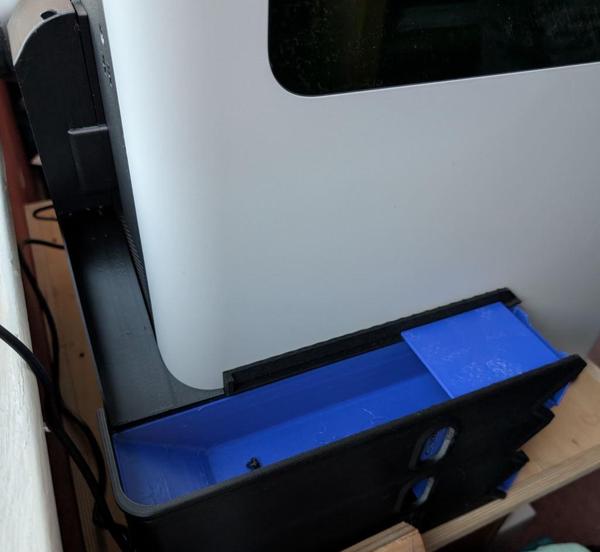
There's now this tray on the side to catch the rubbish (which is a bit excessive in size really; I may design a smaller one in due course). This included several parts that are way too big to have ever imagined printing them on the Prusa (although, of course, I would never have needed them with the Prusa!)

Another negative for me is the "Bambu Handy" app. Ostensibly, this is a useful tool to tell you what's going on with the printer. You can see a live video from inside the chamber (which is great) and you can see how long prints have left. That's all good. It's also supposed to pop up a notification when the print finishes, although in practice, it pops up notification at some point after the print has finished; sometimes a few minutes later, sometimes a few hours later, sometimes shortly after you've started the next print, which is a little confusing.

For the Prusa, I used to use OctoApp. As well as all the live video and (timely) notifications of success / filament run-out etc, it had a "sticky" notification that showed how long is left and (most usefully) what time it would finish. With the Bambu one, I have to open the app, see that it's got (say) 3 hours and 25 minutes left, then look at the clock and add that time to the current time. Only then will I know roughly when the print will finish.

It looks like you can enable LAN-only mode and Development mode on the H2D and then OctoApp will work with it, so I'll probably give that a try to see what it does; I doubt it'll have all the features (as some will depend on "push" notifications from the printer), but it definitely looks worth a try.

If space (and negotiations with the other half!) weren't a consideration, I'd keep the Prusa printer. That would be great as I'd probably never again be in the situation of waiting for a long print to finish before I could start something else going (as I could start the second print on the second printer). The Prusa has been brilliant and incredibly reliable (once the first layer calibration is done, it really is a fire-and-forget type of printer). Alas space is too much of a consideration (and I told my other half I'd be selling the Prusa to offset the cost a little!) so the Prusa is going up for sale.
 
It's a shame you are having to loose the Prusa, are you sure there is not a space somewhere you can accommodate it while it just gets accepted as part of the furniture that's too useful to ditch?
 
It's a shame you are having to loose the Prusa, are you sure there is not a space somewhere you can accommodate it while it just gets accepted as part of the furniture that's too useful to ditch?
I agree it's a shame, but no, not really. Everything's a bit crammed in here.
 
2025-11-19-03-laser_600.jpg


The new printer also has a couple of other tricks up its proverbial sleeves: a vinyl cutter and a laser cutter. The laser cutter is limited (as it isn't that powerful and is obviously limited to the same build area as the printer), but should be quite fun to play with and I'll report back on how that all goes. I have a few specific uses in mind, one of which you'll see the beginnings of in this post. I haven't thought of anything I'd do with the vinyl cutter.

This was one of the main things that tempted me away from Prusa. While a proper laser cutter would undoubtedly be better than something that bolts onto a 3D printer, the bolt-on option means I don't have to find space for a separate laser cutter and with the limited space I have, that's really valuable to me.

2025-11-21-01-testing-with-lime-plywood_600.jpg


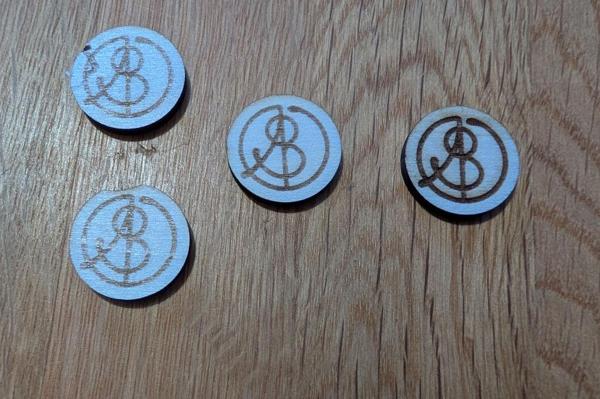
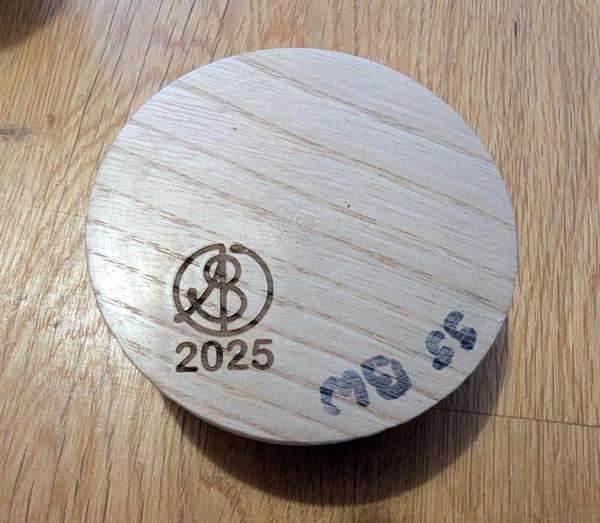
These were the first things I did with the laser cutter, partly just to have a play. The wood is basswood (which I think is the American name for lime) plywood, which came with the printer. As you can see, the results on the left-hand ones were a bit mixed, but that was down to the "Birds-Eye camera" needing calibration and once I'd sorted that out and tweaked the speed/power (which was very easy to do) the results were better.

2025-11-21-07-inside-the-printer-in-laser-mode_600.jpg


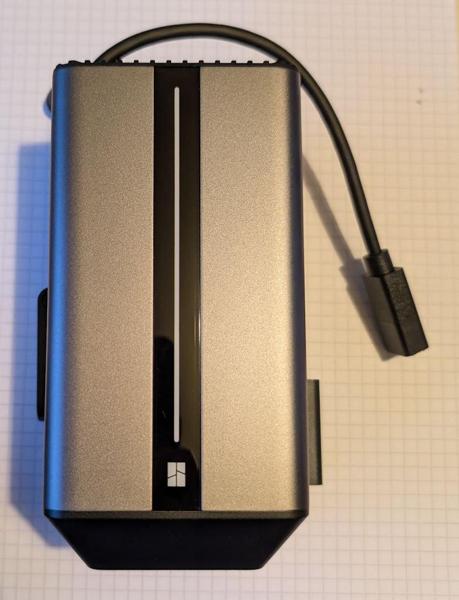
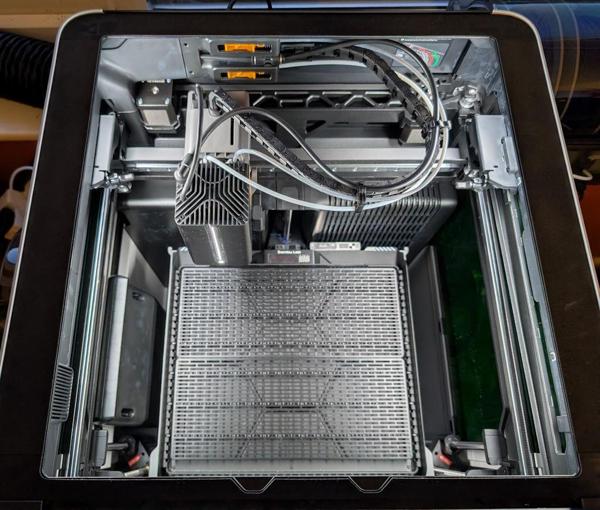
Switching between printing and laser cutting is a very quick process: move the filament reels out the way, pop the lid off, drop the laser onto the tool head, attach the air pipe and power cable and then swap out the magnetic build plate for the laser base plate. It only takes a couple of minutes.

2025-11-21-06-touchmark_600.jpg


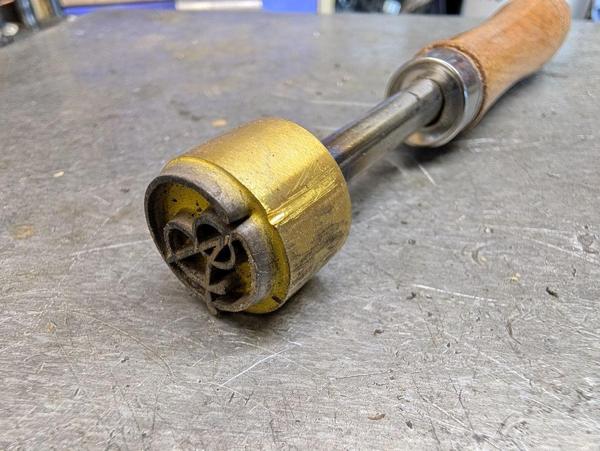
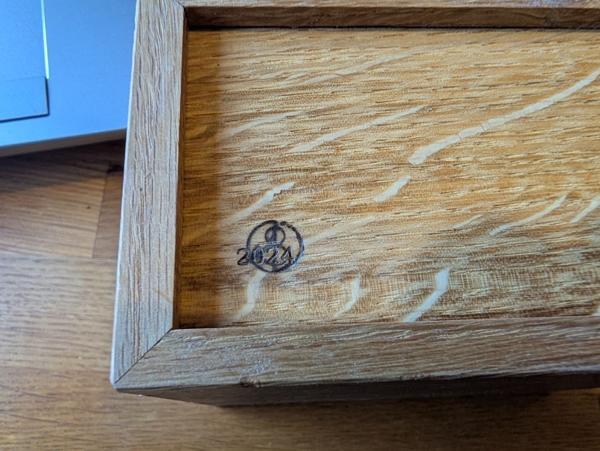
One of the things I'd like to do with the laser (as you might have guessed from the wooden logos above) is add my logo to things I make. I've got a "touch mark" - a brass stamp with the logo cut into it that you heat up and apply to a piece of wood in order to mark it. It works okay, but it has a couple of downsides. Firstly, it's a bit finickety: you have to get it hot enough but not too hot and you have to be careful to make sure it's aligned perpendicular to the part you're marking. Get either of those wrong and you've just messed up the project you've worked so hard on. The second problem is arguably one of economics. When you buy a touch mark, it's obviously a fixed size, so if you work on a project that's a bit smaller you either can't mark it or you have to buy a different size touch mark.

The laser will itself be limited (as the finished part must fit inside the enclosure) but it'll be a lot more flexible for smaller projects like boxes and turned bowls (where I'm more likely to need a smaller mark). For larger projects I can either use the touch mark or mark a smaller part before it's attached to the main project.

2025-11-21-02-samples-with-finish_600.jpg


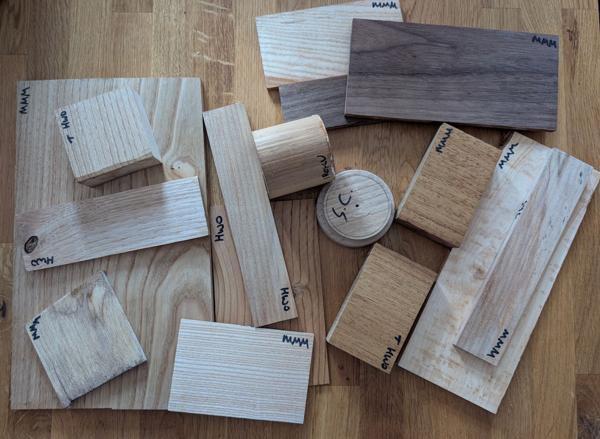
That introduced an interesting question in my mind: can I laser mark previous projects to which I've already applied an oil or wax finish? To that end, I prepared a pile of scrap bits of wood of a variety of different species. Most of these were planed with a smoothing plane but I also prepared two blanks (one Iroku and one Sweet Chestnut) on the lathe and sanded them to 240 grit. The turned ones got a sanding sealer and beeswax finish. The planed ones got a mixture: some were left unfinished, some had hard wax oil, some had Mike's Magic Mix.

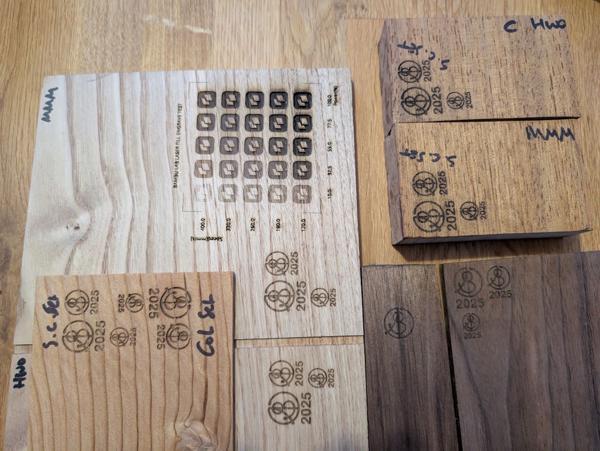
With the blanks prepared, I set about attacking them with a laser. I was quite nervous about doing this and watched it like a hawk while it was running: "burning" and "oil" aren't two words you usually want to string together when you're sitting by a shiny new 3D printer in the dining room! However, in the end it was absolutely fine and produced some nice results:

2025-11-21-03-engraved-samples_600.jpg


The flat ones were quite straightforward. I tried a calibration pattern (which varies speed and power) on a bit of Sweet Chestnut as a starting point and that gave me a speed and power setting to default to. Most of the bits I tried worked fine with that first speed and power setting; only the Cedar of Lebanon needed a little more power to get a good mark.

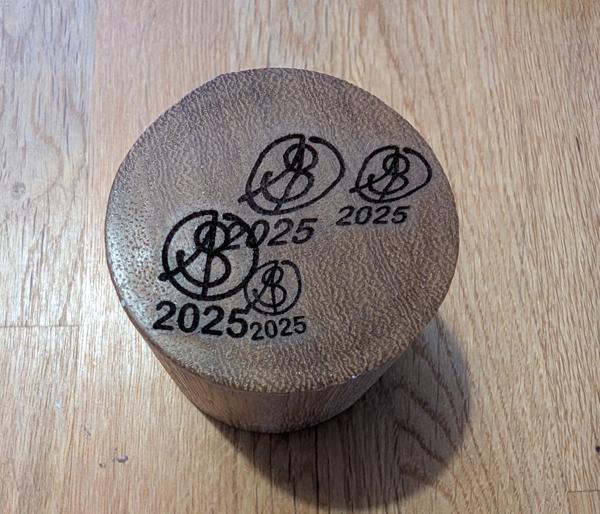
The turned ones were slightly more challenging. Again, the speed and power was absolutely fine. The issue was that on the first (Iroku) sample, I just picked a point on the top for the (automatic) height measurement and then started the engraving process. It seemed to work fine but when I looked at the part the logos were all really distorted. That was because the top of the turned part wasn't perfectly flat (it bowed up in the middle slightly) and that was enough to mess up the look of the logo.

Thankfully, the printer has another trick up its sleeve: a curved surface engraving mode, where you get it to measure the height of lots of points over the area you're going to engrave and then it automatically adjusts itself to conform to the shape. This is the Iroku block after I'd done two runs. The first run had three different logo sizes and all looked distorted. There wasn't much space left for another go, so I just did the second run (in curved surface mode) over the top of the first one and (ignoring the overlaps) it looked much better.

2025-11-21-04-distortion-on-end-of-iroku_600.jpg


This is the Sweet Chestnut one, which also had a slightly curved top, but for which I did it in curved mode straight-away:

2025-11-21-05-nice-on-curved-face-of-sweet-chestnut_600.jpg


The next thing to do is to try it on some actual projects (which is a bit daunting!). There's still some doubt in my mind about how it will cope with trying to engrave in the pocket on a bowl that was turned in that way, but the first try will be on one I don't like as much!

After an inevitably initial flurry of activity, I'm probably not going to do a lot with the laser over the next few months for the simple reason that it needs a ventilation pipe fed out through the window - it's a bit cold outside to have the window open so I can see the laser being something I use more in the warmer months!
 
@Dr.Al
"burning" and "oil" aren't two words you usually want to string together when you're sitting by a shiny new 3D printer in the dining room!
That explains a lot regarding lack of room for redundant printer!!

You must have a more tolerant better half allowing even One in the dining room.
 
@Dr.Al
That explains a lot regarding lack of room for redundant printer!!

You must have a more tolerant better half allowing even One in the dining room.

Since Covid, the dining room has become my working-from-home office, so I get quite a lot of freedom as to what goes in there.
 
Ahh, Utilities and Supermarket Support earns a lot of brownie points.
 
After chopping up a bit of plywood (with a 90 mm hole-sawed hole in it) to cover the window while letting the vent pipe out, I had a bit of session of logo-engraving on the bowls I've made.

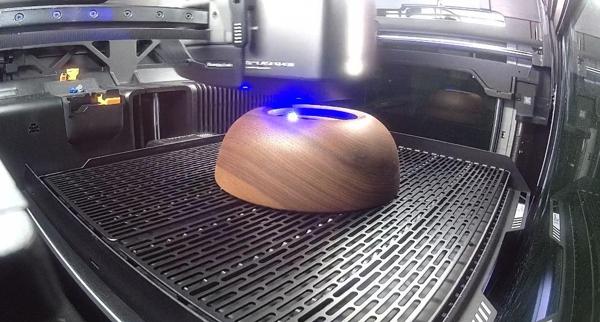
This is a live view from the internal camera while engraving the first one:

2025-11-22-01-live-view-from-camera_600.jpg


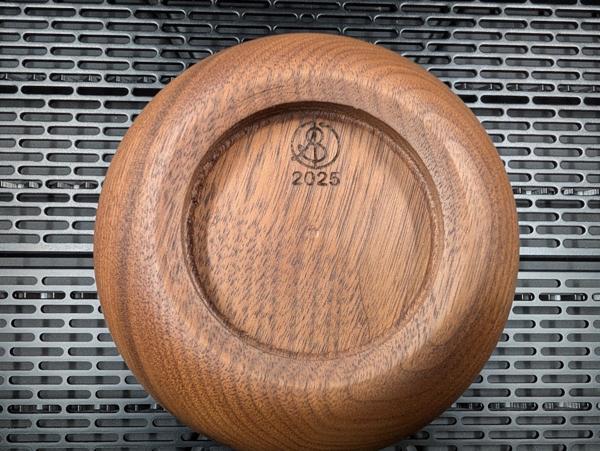
It was absolutely fine with engraving at the bottom of the pocket (although it wouldn't have managed very much deeper):

2025-11-22-03-first-bowl-engraved_600.jpg


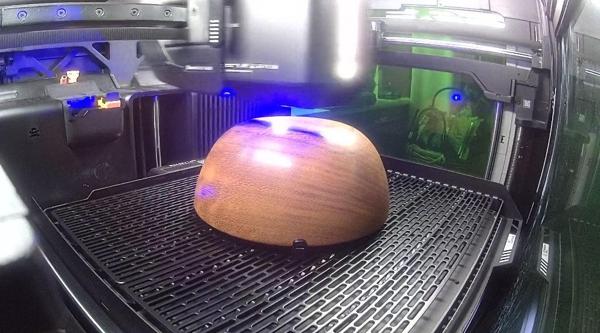
As I plodded through the bowls, a couple of them came out with a rather distorted logo (which I sanded off before reapplying finish). I initially thought it was something going wrong with the height measurement thing but I eventually realised the problem was that the bowl was moving during engraving. The laser head moves back and forward quite violently and shakes the whole printer, so it's not that surprising that a bowl might shift.

For the later ones (and the re-runs of the ones that were distorted) I used some little magnets (that came with the printer) to hold the bowls in place:

2025-11-22-02-bowl-held-with-magnets_600.jpg


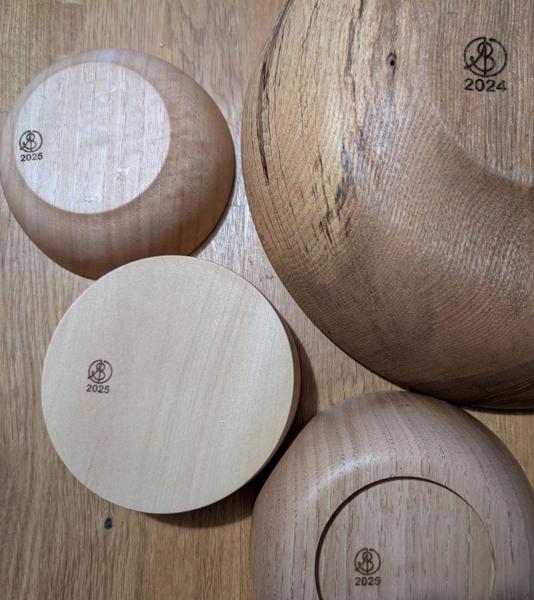
After a couple of hours of working through the bowl collection, I'd engraved logo and date into 28 bowls (of the 29 I've made: there's another one on my desk at work). Here are a few examples:

2025-11-22-04-more-bowls-engraved_600.jpg
 
I've been printing lots of stuff over the last week or so and that's led me to make a few comparisons to the old Prusa:

It's a lot faster than the Prusa, especially when you print with Bambu filament. The slicer is a little optimistic in timing (whereas the Prusa was generally right to within about 5 minutes, even on a multi-day print), but it's not too bad and the actual print times are usually half that of the Prusa and sometimes better than that.

Being able to print easily removable supports is really quite liberating. I've been printing PETG models with supports that use PLA as an interface material and they come off really easily. I've spent inordinate amounts of time in the past designing stuff such that it doesn't need supports (often requiring parts to be printed in multiple pieces that dovetail together). The PLA-interface supports come off so easily that I can see me using them much more often.

Changing filament is far easier. If I'd left a reel of filament on the Prusa and wanted to print with something else, the first step was to heat the nozzle up. Then I could change the filament and then start the next print. If I just wanted to store some filament away in a vacuum bag, again I needed to heat the nozzle up to remove the filament. As the H2D does filament changes automatically, it also retracts the filament at the end of the print and that means changing / storing filament is just a case of pulling it out of the AMS unit.

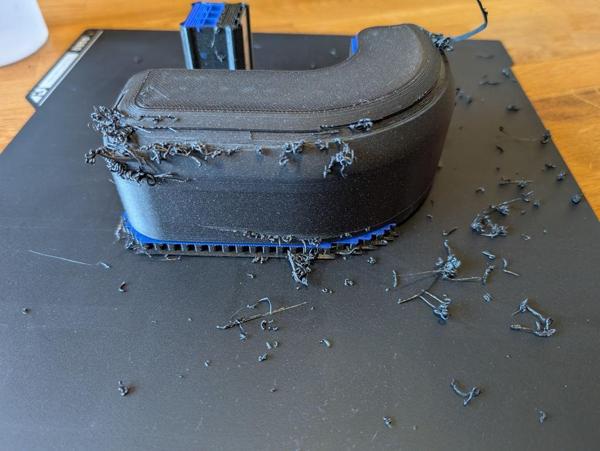
2025-11-29-01-what-a-mess_600.jpg


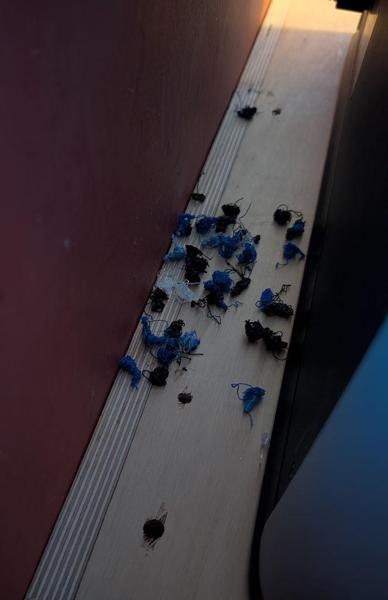
It's much more fussy about filament than the Prusa was. It prints the Bambu stuff really well, but the blue/grey coloured stuff I print with a lot seems to cause it all manner of issues. At first I tried to print it as if it were Bambu filament but it just got lots of nozzle clumping warnings (by the A.I. that looks at various on-board cameras) so I put it through a drying cycle (just in case that was the issue) and then tried the Generic PETG profile. That was a bit better but still got a few nozzle clumps (which have to be dealt with manually). I've only done one small print with Prusa's filament and that went okay but I can see that I'm going to have to pay more attention to filament settings than I ever have before (I used to just print everything on the Prusa PETG setting and that worked fine), especially seeing as Bambu's filament seems to be mostly out of stock.

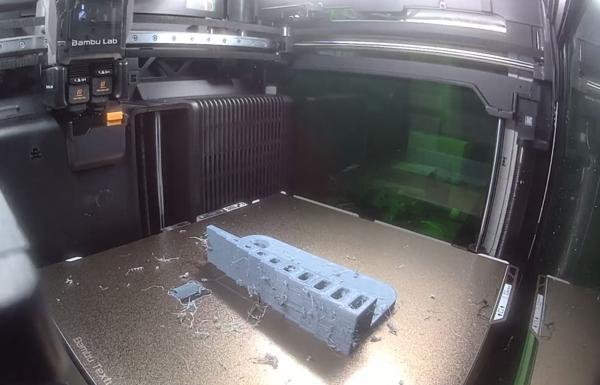
That photo above is probably the worst looking print I've done in years. I've had a (much, much) lesser version of that effect when I've tried to use filament that needed drying. This is a bit different, however. Firstly, I'd only just put the filament through Bambu's 12 hour drying cycle, so I would really hope it didn't need drying. Secondly, all of those wispy bits were loose. When I've printed with damp filaments, the wispy bits were attached to the printed part and needed to be rubbed off. In this case, they were lying on top of it and needed to be swept up.

Another change from the Prusa is that I'm going to have to get into printer calibration, which is something I've never really had to think about. As an example, I print loads of models with 8 × 3 mm magnets superglued into the print. With the Prusa, I'd just model an 8 mm diameter hole in CAD and then press the magnet into the hole in the resulting print. It was a tight fit (so in some cases it probably didn't need superglue) but went in with just a little pressure. On the H2D, pushing a magnet into an 8 mm hole resulted in the printed part breaking and it was a bit too tight even with an 8.1 mm hole.

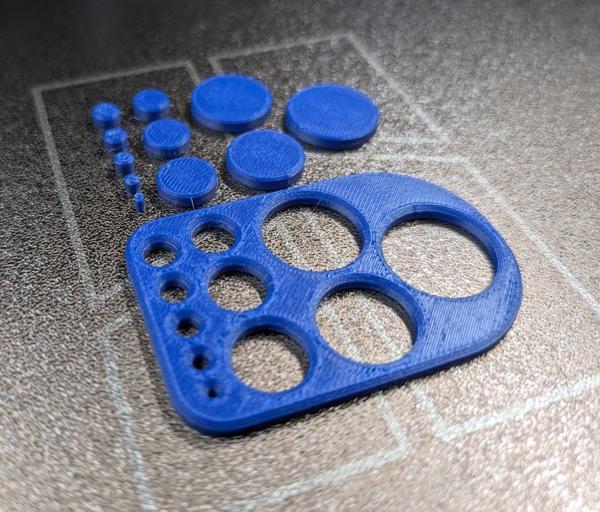
2025-11-29-02-hole-dimension-test_600.jpg


The photo above is a quick dimension test print I did to see how it got on with holes and shafts. The holes start at 2 mm diameter and go up to 20 mm. All are at nominal size, as are the "shafts", which are the same dimension as the hole. Having wrestled them off the build plate (and lost the 2 mm and 3 mm shaft in the process as they pinged off somewhere unknown), I measured them all and they're all approximately 0.3 mm under-size.

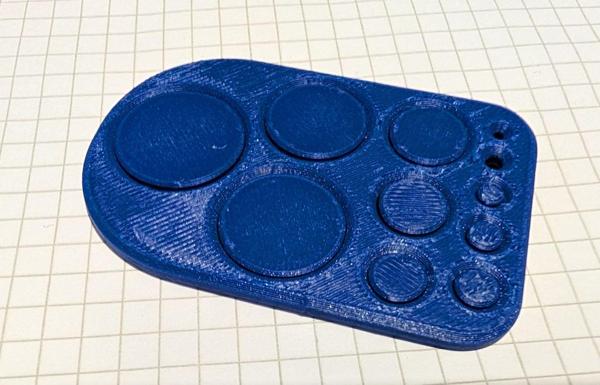
As the shafts and holes are the same amount under-size, they do fit together quite nicely:

2025-11-29-03-self-accurate_600.jpg


However, that isn't much help when you're trying to fit with things from the outside world. I measured the outside dimensions of the block and that was about 0.3 mm small as well, so I printed these two 100 mm long blocks to see how they came out:

2025-11-29-04-xy-dimension-test_600.jpg


The X one is 99.65 mm long and the Y one is 99.75 mm long, so as a percentage it's not that bad. I'm now experimenting with some settings to see what difference they make. You can tweak the "shrinkage" value for a particular filament and I think that helps with overall size (although for 0.3% I think I'll leave that for now). You can also play with some X-Y compensation values, of which there are three:

  • X-Y hole compensation
  • X-Y contour compensation
  • Auto circle contour-hole compensation

The latter one is marked as an experimental feature and it does seem to help. Printing the hole/shaft test model resulted in everything being much closer to nominal. The holes varied a bit but were typically about 0.1 mm over size. The shafts were about 0.1 mm under size with a little ridge (probably from the layer transition seam) on one side taking them to 0.1 mm over size. The result of all that is that the shafts are a relatively loose but retained fit in the holes and the holes are an okay size for pushing magnets into.

The down-side of that setting is it apparently only works for Bambu filaments and not even all of the ones that Bambu offer.

The Prusa was pretty much spot on out of the box (well, after I'd assembled the kit anyway!) so this is all extra faff to me, but hopefully it'll be worth it in the end.
 
Super interesting comparison thanks for taking the time. I’m getting closer to buying one, as I keep coming up against things I think I could use it for. I think that’s in a good part due to how many YouTubers use them giving ideas of how to integrate into work. Interesting they are always Bambu lab so their marketing department is obviously working hard! This comparison shows it isn’t all perfect.
 
It's been a while since I've posted on this thread but I've been using the printer a lot (447 hours so far according to the printer information). I thought it was a good time to write up my thoughts on the printer so far.

There's lots to like about it and I'm certainly not getting buyer's remorse, but there are a few strong niggles.

This is a long post, so if you're interested, grab a cup of tea or coffee and read on!

The Good Stuff:​


Size​


It's big! I've already printed quite a few things that are at the limit of the size of this new printer and for some of them there's no way that I would have been able to print them with the old printer (even in multiple pieces as the models wouldn't be suitable).

Speed​


It's fast for big models! There are quite a few models that I never would have attempted on the other printer just because it would have taken so long (arguably increasing the chance of something going wrong).

For really small models it can be slower than the Prusa (due to the 10 minutes of pre-flight checks it does on every print).

Nozzles​


It's very quick to change nozzles (although nowhere near as quick as the Bambu instructions imply - if you follow their instructions the nozzles won't come out). That means I don't think twice about printing with bigger nozzles (thereby speeding up printing further). On the Prusa I had to re-do the first layer calibration after changing nozzles so I only did it when absolutely necessary.

Noise​


It's quieter than the Prusa. With the Prusa running in the dining room, we'd generally shut the dining room to keep the noise down, but we don't always bother with the Bambu one. I think this is mainly just because it's in an enclosure rather than being an open printer, so I'm sure it could have been resolved on the Prusa.

Multi-Material​


The multi-material capability is useful. I've printed quite a few things with supports (using PLA as an interface material on the PETG prints). I generally did everything I could to avoid supports on the Prusa because it was a pain cleaning them off but being able to add supports has offered some useful design freedom.

Laser​


It's got a laser! I really like being able to laser engrave my logo on the bottom of wood projects. I've also used it to cut a few parts; I'm not sure how much I'll use that in the long term, but we'll see.

Mediocre​


These are the the things I consider to be bad, but resolvable:

Build Plate​


The build plate that came with it was awful. Anything with a wipe tower, anything with supports or anything small was a complete nightmare to remove from the build plate. In one case I tried all sorts of things (including chilling the plate) but the last few bits ended up having to be removed with a hot air gun and a brass brush. I also dislike the rough texture left on the bottom of parts printed on the stock plate. I've resolved this one by buying two build plates from Oseq in the Czech Republic. They're miles better and very similar in performance to the Prusa satin plate I'm used to.

IP Security​


I dislike the fact that the default setting is to send files from my laptop to the printer via a server in China. I've put the printer into LAN-only mode (and also developer mode) to disable that functionality.

Bambu Handy (mobile app)​


The Bambu Handy mobile app is pretty awful (and doesn't work if you put the printer in LAN-only mode, but that's no great loss). Having got used to OctoApp (a mobile app for Octoprint) on the Prusa, Bambu Handy seemed like a major backwards step. It's flaky (video feeds often produce an error) and the notification with the end time can be easily dismissed and can't be retrieved without starting a new print.

Error notifications (e.g. out of filament) sometimes only pop up several hours after the error has occurred (and sometimes only when you happen to start the next print!). However, when you're doing a laser cutting job, it pops up a "Task Success" notification for every job, including calibration and measuring steps, so you get a ridiculous number of notifications.

Bambu Handy also drains the mobile phone battery really quickly.

I've resolved this one by setting up OctoApp, which I discovered works with Bambu printers as well (albeit requiring a raspberry pi or other linux server on the network).

Accuracy​


There are a few aspects to this. The first is print accuracy. Out of the box, the printer (and the Bambu Studio slicer) doesn't print things in the size you expect. On the Prusa, if I wanted a hole for an 8 mm magnet, I'd model an 8 mm hole. If I do that with the Bambu printer (and the default settings), the magnet won't fit.

There are a few relevant settings in the slicer, in particular:

  • X-Y hole compensation
  • X-Y contour compensation
  • Auto circle contour-hole compensation

These have to be used to get parts to be the right size. Not a big deal, but Prusa had sorted this all out for me so I never had to think about it before.

Slicer​


Bambu Slicer has a rather laughable (but apparently intentional) bug. If you have your printer in LAN-only mode, you have to tell it the printer's IP address and "Access Code" every single time you restart Bambu Studio. Having dug into it, it does save the access code in a file in the configuration directory, it just doesn't read it back. It doesn't save the IP address anywhere.

According to Bambu this is because of "privacy concerns regarding storing IP addresses". Absolutely ridiculous.

I've put up with this for a while (and learnt the IP address and access code off by heart having typed them in so many times), but I've now switched to Orcaslicer, which does remember the information. I had to use the "Nightly build" (i.e. bleeding edge development version) as the stable releases don't support the H2D. I also had to change the network settings in Orcaslicer to get round an issue with it being unable to send files to the printer.

Bambu Studio also has a bug where it'll sometimes think the printer is busy even though it obviously isn't. Orcaslicer also does this sometimes so I think it's a bug in the (common) Bambu network plug-in. The solution to this is to restart the slicer at which point it realises what's going on.

The other software (for the laser function) "Bambu Suite", is buggy and crashes regularly.

Timing Accuracy​


On the Prusa printer, if the slicer told me a print was going to take (say) 18 hours and 35 minutes, I could be pretty confident of the finish time, to within about ±5 minutes.

On the Bambu, everything takes at least 10 minutes longer than claimed (because it doesn't include the pre-flight checks in the time estimation and they take about 10 minutes) and even after that, the estimations aren't that great. A 30 minute print might take 35 minutes after the pre-flight checks, but a 12 hour one is likely to be 12½ hours. Not a big deal, but having got used to printing sequences of prints with care being taken to ensure the switch-over time was (e.g.) just before I went to work in the morning, I now have to add a bit more tolerance into that calculation.

Print Failures​


I've definitely had more print failures with the H2D than I had with the Prusa. Part of this is probably that I'm doing more ambitious things with the printer (printing bigger stuff and using supports). Some of this is that the clever auto-monitoring features (using A.I. to detect print failures) is a bit over-sensitive and sometimes reports false errors (so you have to manually tell it to resume).

It's not the end of the world, but can be a bit frustrating when you've printed something overnight and expect it to be finished in the morning but it's actually stopped with several hours left to go due to a false positive error check.

The Closed Ecosystem​


The Prusa printer was eminently upgradeable and tweak-able, in fact it's part of the Prusa philosophy in general. The Bambu printer isn't. In most situations, this doesn't matter but it's a bit annoying at times. If you load non-Bambu filament into the "AMS" filament box, you have to manually tell it what that filament is. Not a big deal, but a little tedious.

For the Deeplee stuff, I generally add one of the Bambu RFID tags to the reel when I'm ripping the cardboard sides off and fitting the Bambu outer spool. That way, the printer thinks it's got Bambu filament even though it isn't (that's fine for the Deeplee filament as it works really well with the Bambu filament profile). It would be nice if the AMS would support open RFID tags and then you could auto-detect other filaments. There are work-arounds for this, but I haven't decided yet whether I can be bothered with them!

The Bad​


Filament​


It seems to be really fussy with PETG filament. With the Prusa I could print pretty much any PETG with no issues at all. On the H2D, I can print Bambu filament and Deeplee Grey filament (I've also tried their black, which works but is a bit glossy for my taste) but others I've tried seem to cause it issues.

Admittedly I haven't tried very many others, but I've tried the CC3D filament I used a lot on the Prusa and I've also tried the Prusa filament. Both give similar results with any of the profiles I've tried (including Bambu's one, the Generic PETG one and a Prusament-specific one for the Bambu X1C I found on the web).

A typical result of a print with these filaments is this one, with Prusament filament:

2026-01-03-shabby-prusament-print-screenshot_600.jpg


Photo of the same print after removing from the printer:

2026-01-03-shabby-prusament-print-photo_600.jpg


Not great (I reprinted that part using Bambu filament and it worked fine).

Simple parts seem to print okay; it's only more complicated ones that cause problems:

2026-01-03-simple-parts-print-okay-in-prusament_600.jpg


I'm sure there are settings that can be tweaked in the slicer to sort this out, but I haven't figured out what they are yet and I struggle to get the enthusiasm together to spend the time testing things (I see the printer as a tool rather than a hobby in itself and I'd rather just have it work).

I tried printing a "torture test" with Prusament using the Generic PETG profile (which is much slower than the Bambu one) to see if I could work out what setting I needed to investigate. The print failed (with an extrusion motor overload error) before it had even finished printing the base.

At the moment, I'm just sticking to Bambu filament (which is quite hard to get hold of as they seem to be permanently out of stock) and Deeplee grey filament, along with the Bambu PLA, but that's only used as a support interface, so one reel will last me a very long time.

Laser Birds-Eye Camera​


The laser is set up using a built-in camera, which takes a photograph of the workpiece upon which you place the thing you want to engrave/cut. It's not very accurate. It has a special "birds eye camera calibration" sequence, but that doesn't help much.

I think the problem is probably that it suffers badly from parallax; it's probably been designed assuming that the only things it will be used with is 3 mm plywood sheet. If you put something big in there (like a box or a bowl you want to engrave) then the results are very, very inaccurate.

This has caught me out on a number of occasions. On one, I wanted to add a date underneath a logo that I'd previously added to a box using a branding iron. I positioned the text of the date neatly underneath the logo and then ran the engraving sequence. This was the result:

2026-01-03-laser-inaccuracy_600.jpg


Now I'll have to try to remove that mark (which is going to be non-trivial given it's on the recessed part of a box) and do the whole thing again.

My work-around for this in general is to use the variable-height mapping feature to measure the part. I can then position the logo relative to the height changes. However, there's no way (in Bambu Suite) to go back to the photo and check it looks right after you've done the height mapping process.
 
Hi Al

I'm posting because I revisited your thread recently and much appreciate your info which helped me to decide.

I bought a s/h but virtually unused Creality Ender 3 S1 pro around 18 months ago, just hobby use and found it fascinating as well as extremely useful though needed to get my brain in gear again with Fusion 360 when I wanted to make anything from scratch. A new handle for our discontinued Shark floor steamer convinced my wife and the usual dragons, toys and other stuff in free downloads were well received however I'm sufficiently hooked to lust after an upgrade despite the S1 being perfectly suitable so........I pushed the button last week and bought the new Bamboo Labs X2D combo, not as posh as yours but I'm more than impressed with the small amount I've used it in the last couple of days especially at the minimal amount of "printer poop" it excretes on colour change compared with the amount of waste my nephew's P2S chucks out.

I'm too busy at the minute to get into it properly and will need to sell the creality to keep the missus happy but I have a smile on my face at the minute with a new boy's toy. :) My wife didn't ask how much so I forgot to tell her....shush :whistle:

As an aside I didn't realise the engraver ran through Bamboo studio, my Creality Falcon 2 runs on Lighburn or one of the free alternatives and I assumed they all did, have you tried?
 
Interesting that chinese servers was mentioned
A lad at work is mad keen with 3d printing having been allowed by his dad to convert the double garage into a studio- hes got half a dozen set up in there.
Hes also mad about drones -something for the summer.
The US has banned the sale of new DJI drones because of security issues related to the server being in China
I dont think printers would incur draconian moves like that
But you never know with the orange man....
 
As an aside I didn't realise the engraver ran through Bamboo studio, my Creality Falcon 2 runs on Lighburn or one of the free alternatives and I assumed they all did, have you tried?

It's Bambu Suite rather than Bambu Studio, but no: I haven't tried any alternatives. I use it so rarely and for such simple things that I've found Bambu Suite to be fine so far.
 
Back
Top