

-
Hi all and welcome to TheWoodHaven2 brought into the 21st Century, kicking and screaming! We all have Alasdair to thank for the vast bulk of the heavy lifting to get us here, no more so than me because he's taken away a huge burden of responsibility from my shoulders and brought us to this new shiny home, with all your previous content (hopefully) still intact! Please peruse and feed back. There is still plenty to do, like changing the colour scheme, adding the banner graphic, tweaking the odd setting here and there so I have added a new thread in the 'Technical Issues, Bugs and Feature Requests' forum for you to add any issues you find, any missing settings or just anything you'd like to see added/removed from the feature set that Xenforo offers. We will get to everything over the coming weeks so please be patient, but add anything at all to the thread I mention above and we promise to get to them over the next few days/weeks/months. In the meantime, please enjoy!
You are using an out of date browser. It may not display this or other websites correctly.
You should upgrade or use an alternative browser.
You should upgrade or use an alternative browser.
Insert URL with text button.
- Thread starter AndyP
- Start date
When you add the switch you do it Like this but wit...n2.co.uk)TWH2(/URL)
Make sense?
Cheers
Mark
Sorry re reading I honk I've misunderstood what you're trying to do...
Mark, You can honk as much as you like. 
When the mouse hovers over the URL button the two options are visible but it seems impossible to select the second option which allows both the web address and the text to be inserted. Does that explain it a bit better?
When the mouse hovers over the URL button the two options are visible but it seems impossible to select the second option which allows both the web address and the text to be inserted. Does that explain it a bit better?

DaveL
Old Oak
I don't think there is anyway of directly selecting the second option, I use the default and then cut and paste to get to the second option.
Haha. Honk honk!
Not sure what you mean and can't look right now. Will have a look when I get home from work.
Cheers
Mark
Not sure what you mean and can't look right now. Will have a look when I get home from work.
Cheers
Mark
This is what I see when I hover over the URL button. A little yellow box appears.
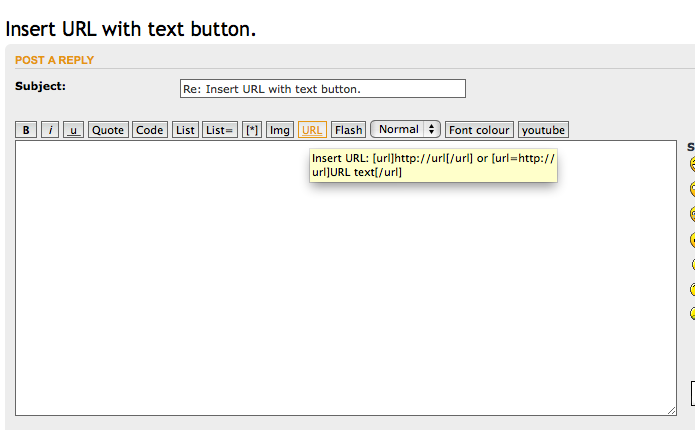
How do I select the second option into a post so that I can then insert the URL and relevant text without having to cut and paste or retyping the whole thing

How do I select the second option into a post so that I can then insert the URL and relevant text without having to cut and paste or retyping the whole thing
Ahhhh. You don't! They are not options you select, it is purely a tooltip showing you the two ways you can choose to display a URL, either by showing the actual URL (opt 1) or by hiding the URL behind some clickable meaningful language (opt 2). All the button does is place the opening and closing switches either on their own for you to type into, or either side of any text you highlight then click the button.
Sorry, you're trying to be too clever!
Cheers
Mark
Sorry, you're trying to be too clever!
Cheers
Mark
Andyp":316ipbqb said:...so that I can then insert the URL and relevant text without having to cut and paste or retyping the whole thing...
Still not sure I understand what you mean by this though...
No matter what you do you always have to either type or cut/paste the URL or text in there. How else would you expect it to get there?
Cheers
Mark
I really should have studied english at school.  Been living here too long and now I cannot makes sense in either language.
Its is not the getting the URL in there that is the problem but the stream of code as contained in the Tooltip
I'll try again. When you hit the URL button this appears in the text box. One then copies the relevant URL and insert it between the brackets.
What I thought one could do was select the code in the Tooltip so that [ url=http://url]URL text[/url] appears on the text box but obviously not.
I'll go and crawl back under my stone now.
Been living here too long and now I cannot makes sense in either language. Its is not the getting the URL in there that is the problem but the stream of code as contained in the Tooltip
I'll try again. When you hit the URL button this appears in the text box. One then copies the relevant URL and insert it between the brackets.
What I thought one could do was select the code in the Tooltip so that [ url=http://url]URL text[/url] appears on the text box but obviously not.
I'll go and crawl back under my stone now.
Haha, nope sorry, just there to show you how to do it. No automation unfortunately.
Cheers
Mark
Cheers
Mark
I am not at all sure that anyone else will be interested in this but I will waffle on anyway.
I find including long URLs in a post a bit unsightly. I prefer to link the URL to a word in the post but the code does not come up when the insert URL button is selected and remembering how to type the code has proved to be beyond my capabilities.
So I have used the Keyboard Preferences, Text Replace/With, functionality of the iMAc to automatically replace with TEXT. Then all I have to do is copy and paste the URL and add suitable text.
I find including long URLs in a post a bit unsightly. I prefer to link the URL to a word in the post but the code does not come up when the insert URL button is selected and remembering how to type the code has proved to be beyond my capabilities.
So I have used the Keyboard Preferences, Text Replace/With, functionality of the iMAc to automatically replace with TEXT. Then all I have to do is copy and paste the URL and add suitable text.

Mike G
Petrified Pine
Why is it even that complicated? No other fora require that sort of effort. You simply highlight the words you want to turn into a link, click the icon, and paste into a pop-up box. What happens here with regard to inserting links dates from about the mid 80s, I reckon.
TrimTheKing":3057zpgy said:
Because when I want to link, for example to the Members Map, I prefer to see Members Map
rather than https://www.google.com/maps/d/viewer?mid=zLvnPjOY-qKw.kahH9-O5eaVc
Am I getting through yet?
Sorry, I know I am not at all good at explaining things
Mike G":2whtdv3w said:Why is it even that complicated? No other fora require that sort of effort. You simply highlight the words you want to turn into a link, click the icon, and paste into a pop-up box. What happens here with regard to inserting links dates from about the mid 80s, I reckon.
That would be cool but probably beyond our technical capabilities, or the PHP forum software.
Andy have you cut my text out of my post?
Nope you're not making sense!
So doing what you want, I type Members Map then highlight those two words. Next you click the button which puts in Members Map
Then I click my mouse in the first box after the L and before the ] and type a = then paste the URL. Done!
What's more difficult about that than the way you do it?
Cheers
Mark
Nope you're not making sense!
So doing what you want, I type Members Map then highlight those two words. Next you click the button which puts in Members Map
Then I click my mouse in the first box after the L and before the ] and type a = then paste the URL. Done!
What's more difficult about that than the way you do it?
Cheers
Mark
Mike G":2wlwjie2 said:Why is it even that complicated? No other fora require that sort of effort. You simply highlight the words you want to turn into a link, click the icon, and paste into a pop-up box. What happens here with regard to inserting links dates from about the mid 80s, I reckon.
This is probably an add on so I can search the phpBB database to see if I can find it. If it's there then I will lab it on my Dev instance of the forum and assuming it works I can implement in live.
Cheers
Mark
TrimTheKing":yaut7sj6 said:Andy have you cut my text out of my post?
Nope you're not making sense!
So doing what you want, I type Members Map then highlight those two words. Next you click the button which puts in Members Map
Then I click my mouse in the first box after the L and before the ] and type a = then paste the URL. Done!
What's more difficult about that than the way you do it?
Cheers
Mark
Didn't cut the text honest guv. Just quoted
Your way maybe easier
but then I had no idea it could be done like that 
Rod
Old Oak
I don't think you can do anything like that using Tapatalk - can you?
Rod
Rod
Rod":1el1y6wh said:I don't think you can do anything like that using Tapatalk - can you?
Rod
No I don't think so Rod.
Mark
Andy/Mike I think I might have found a MOD that does just what you're looking for...
Cheers
Mark
Cheers
Mark

- Joined
- Jul 21, 2014
- Messages
- 10,414
- Reaction score
- 164
TrimTheKing":11ifynnj said:Andy/Mike I think I might have found a MOD that does just what you're looking for...
Cheers
Mark
Mark, Whilst you are in a mode to be considering MODS, dare I raise the subject of Buttons?
Bob

Yep will look later. In the bath right now with raging headache and sore throat!

Cheers
Mark
- Joined
- Jul 21, 2014
- Messages
- 10,414
- Reaction score
- 164
TrimTheKing":xvpmb9cc said:
Yep will look later. In the bath right now with raging headache and sore throat!
Cheers
Mark
Don't drop your phone in the bath!
Hope you feel better soon m8
Bob
Haha, well it survived falling in my pond over the weekend...
Was moving the pump with phone in jacket breast pocket and leant over...plop!
Dived in straight away and was only probably in there less than 10 secs but was right at the bottom. Powered off immediately and shook out all I could. Towelled off and shoved it in a Tupperware box of dry rice on top of the megaflow for 36 hours. Powered up Monday morning no problem! Phew!!!
Cheers
Mark
Was moving the pump with phone in jacket breast pocket and leant over...plop!
Dived in straight away and was only probably in there less than 10 secs but was right at the bottom. Powered off immediately and shook out all I could. Towelled off and shoved it in a Tupperware box of dry rice on top of the megaflow for 36 hours. Powered up Monday morning no problem! Phew!!!
Cheers
Mark

Andyp":3kmsbjlr said:....
I'll go and crawl back under my stone now.
Waterstone ? Which grit ?