SamQ aka Ah! Q!
Old Oak
Thank you for the clarifications Alasdair.


The maximum size of uploaded images is set in the AdminCP by file size, pixel dimensions, or both. In the case of your two keyboard images, the XenForo software actually compressed them for display (on my Mac laptop). The first image is 1200 x 1072 pixels and was resized to 1018 x 909 to fit the browser window and my display. The second image is 1200 x 875 pixels and was resized to 1018 x 742 to fit my display. When images are scaled down, clicking on them will open them up in the image viewer and allow viewing at full size. I'll verify this later, but I think if I view them on my iMac with a larger display, they will likely be displayed without compression.Alasdair, is there an optimum pixel (or Byte) size for images for the software to handle, for instance my keyboard images above have been expanded to full page (on my system anyway) is this the case regardless of source? it seems unnecessary in your face for such in this instance.


No it is not implemented - for several reasons:EXIF Data
Is the above option implemented on the board to remove personal location information in images from the public view.
The previous comment about drag and drop brought it to mind.
Thank you for the detailed explanation, I personally orientate and strip EXIF data by default (just my way of working) 99% of the time but knowing the info. re- forum settings is available to a forum search if the need arises means it can be forgotten along with the majority of recent musings.............
The way that Xenforo works is:
- it uses EXIF data to rotate images - so all the angst on the previous forum may return if you strip out all EXIF data before uploading an image - if the orientation is not written into the EXIF, then the forum software can't read it and hey presto we are back to upside down photos!
- if the image uploaded is within the forum settings (max 1200px wide / 1200px height / 1mb file size) then the file is uploaded exactly as is including any extant EXIF data
- if the image uploaded is bigger than the forum settings then the xenforo software will re-size it and as a part of that process the EXIF data is removed
- if the image is uploaded to the forum using the gallery module, then no EXIF data is removed...
..................

I'm looking at this now but I can't for the life of me remember what they were, can anyone else?Great work and a big thank you.
Are we going back to old oak and such like rather than "well known member"?

Hello team, just wondering if there's any way to upload PDF documents now?
Yep, me playing with things. Have just turned them off again.Trophies: has someone been fiddling with the buttons? I've suddenly got about 5 of them.

With hardly any posts, I remember being called a 'seedling'.I'm looking at this now but I can't for the life of me remember what they were, can anyone else?
Ones I can remember were
Sapling
Old Oak
Sequoia
I think there were two others, maybe only one, but I can't remember them, or what the post thresholds were for them...
Seems the same on my iPad as any other site - are you able to compare with another site using the same software (such as UKW)?I’m loving the new site, it has occurred to me though that the print (point size?) is a little small?
Well it seems that way to me on my iPad.
Ian
Ian, if you look for the 3 little parallel lines or dots symbol in the top RH corner of the page, then navigate down to Zoom, you should be able to adjust the size of the display until it suits. Alternatively, Control+ will give you the same effect, but only, I think, as a one-off rather than as a permanent setting.I’m loving the new site, it has occurred to me though that the print (point size?) is a little small?
Well it seems that way to me on my iPad.
Ian
Making the process of getting to the New Posts page as easy as possible (especially when at the end of a thread) would be really handy.
Ah! I hadn't spotted that. ThanksThe lightning flash button (next to the search button) is persistent on the menu bar and takes you to new posts.
I expect there are lots more little nuances like this that we will all discover over the next few weeks.
Ta-Daaaaaaa, sorted. Default was 20 per page, I've just pushed it to 40, let me know if that's enough. I think there's a balance to not having too many per page because people may want to remember which page a certain things was on, so 40 feels like a decent number.(As an aside, I believe page lengths are somewhat shorter in the new software compared with the old.)
How many times you've received a "Like" or similar.In our profiles I see a category for "reaction score." What is that meant to tell us?
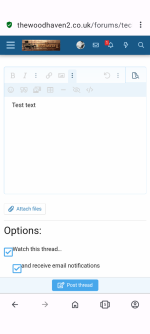
That only happens to me when in preview mode...I've noticed that when posting, the menu buttons for formatting, inserting smilies etc are greyed out and inaccessible, as in the screenshot here. Is this a problem at my end or the forum's?View attachment 25779