• Hi all and welcome to TheWoodHaven2 brought into the 21st Century, kicking and screaming! We all have Alasdair to thank for the vast bulk of the heavy lifting to get us here, no more so than me because he's taken away a huge burden of responsibility from my shoulders and brought us to this new shiny home, with all your previous content (hopefully) still intact! Please peruse and feed back. There is still plenty to do, like changing the colour scheme, adding the banner graphic, tweaking the odd setting here and there so I have added a new thread in the 'Technical Issues, Bugs and Feature Requests' forum for you to add any issues you find, any missing settings or just anything you'd like to see added/removed from the feature set that Xenforo offers. We will get to everything over the coming weeks so please be patient, but add anything at all to the thread I mention above and we promise to get to them over the next few days/weeks/months. In the meantime, please enjoy!

Photo Testing

Same photos emailed from iphone to win 10 laptop

taken landscape screenshot.jpg

Taken portrait screenshot.jpg

Here we see win 10 being capable of reading the orientation part of apple picture file format.

For those who are not aware, Apple record the image in the orientation that is comes off the camera sensor, it then appends information on the orientation that that is was taken. Apple claim this is for speed and faster effective shutter speed to be ready for the next picture.

Bob
 
Same again but win 7

Taken portrait win7 screenshot.JPG

Taken landscape win 7 screenshot.JPG

So now we see that win 7 is not interpreting the orientation information

For my own amusement, I repeated this again on a win xp machine and it behaves the same as win 7 ie ignores the orientation info. Win zp does not have the part screen shot capture so you will have to take my word for it.

So for members with different operating systems and cameras you can see the source of confusion.

However I maintain (until proven otherwise) that taking photos on apple camera devices will work correctly if you only EVER take them in landscape in the first place and with volume buttons on the bottom edge.

Bob
 
However, I sometime forget to take in landscape every time so this is my method for forum writeups.

I email all my pics from my phone to my computer of choice and drop into a folder for the project on a shared network drive.
I then view them on that computer. Turn it round until happy then take a screenshot giving it a sensible title relevant to my proposed write up. Rinse and repeat for all pics and yes that does mean I two of everything.

Then I plan my write up, enter the text on the forum inserting pics as I go, readily identifying them from the titles. What is more every single one goes in the right way round no matter which platform I'm sending from. Win10( laptop in sociable mode, Win 7 in the office or (rarely) win XP direct from the workshop - perfect every time. It even works if I start the write up on one platform and do a bit more from another.

Bit like this thread - has been composed on three differnt platforms to illustrate how they behave differently

Bob
 
Taken with ipad

Landscape, volume buttons down
225F63D7-82C6-4AEA-8B29-4693663AC8BC.jpeg

Portrait, volume buttons top right
0005FE1B-8065-496E-B244-616F16E8CB1D.jpeg

Well I never expected that

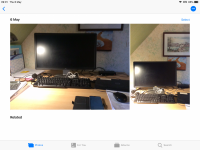
This is how they look in the photos app
3A8DE4C0-07B2-4641-A534-F42FEFD334E0.png
 
Taken Samsung A20e, android, emailed and then downloaded to iPad

Landscape
9D3D135A-717C-4D71-96AC-F5052F510FF0.jpeg

Portrait
6034BACA-B6DA-4C70-AA40-4AD7F6B8741F.jpeg

How they appear in Photos app
C05F499E-B425-42BB-B338-DC33137A0449.png
 
Woodster":msx48o3p said:
View attachment 1


Both taken with an iPad held the right way up - Lens at the top. ;)

The landscape one isn’t landscape then surely, if you’ve held the iPad upright the whole time? Unless the iPad uses its camera in a different way to the iPhone...which I have neither the time nor inclination to get into.
 
TrimTheKing":3ddgpuba said:
Woodster":3ddgpuba said:
View attachment 1


Both taken with an iPad held the right way up - Lens at the top. ;)

The landscape one isn’t landscape then surely, if you’ve held the iPad upright the whole time?

I don't have an iPad, but if I remember correctly, the lens is in a corner. If that's true, then there are two orientations where the lens is at the top - one portrait, one landscape.
 
Ahhhh I didn’t twig that, I assumed ‘right way up’ referred to camera at the top and home button at the bottom. I missed the nuance. :)
 
Do you still want me to ring Mark or is this thread doing the job? I can do a similar test if you want when I get into my office.

Adrian
 
TrimTheKing":2ykvzwzn said:
Andy

Have you got rotation lock enabled on your iPad? That’s the only reason I can fathom for your iPad results.

Defo not Mark . Lock Rotation is off
 
Andyp":1d7y3x5h said:
Taken with ipad

Landscape, volume buttons down
View attachment 3

Portrait, volume buttons top right
View attachment 2

Well I never expected that

This is how they look in the photos app
View attachment 1

Hmm! looks like ipad and iphone have different camera positions.
on my phone, looking at the screen, in portrait the volume button are on the left and the lens top right.
Maybe my so called "rule" should be camera at the top rather than buttons at the bottom.

Interesting re your samsung. maybe they have followed apples lead in photo file format especially as your mac get the orientation correct.
Another possibility is that the EXIF info on photos is being read by your mac and implementing camera specific display orientation manipulation.
Here is some of the exif info on the portrait picture in my tests last night.
It shows the rotation instruction that apple and win 10 are using.

Bob
portrait exif info 3602.jpg
 
AJB Temple":3im404kd said:
Do you still want me to ring Mark or is this thread doing the job? I can do a similar test if you want when I get into my office.

Adrian

I was just going to talk you through this mate so feel free to call if you fancy a general chat or just follow this if you’re happy. I want to know if it works for you as it will be a stop gap solution to ensure you’re happy posting pics until we have the new forum up and running.
 
Just called you Mark and phone was off. Waiting for Photos to sync then will post some test shots.
 
Portrait screen button.jpeg

landscape screen button.jpeg

portrait awakward volume button.jpeg

landscape awkward volme button.jpeg

Four versions of same photo. Camera is in fact an iPhone 11 Pro (not X as I previously said - they all look the same). It is running 14.4.2. Uploaded on Safari, latest version using my normal laptop used for forum generally. All photos synced from iPhone to Photos on Mac, then dragged to desktop and renamed. No rotation.

Also did test on another forum I have access to. Interestingly on WHII upload (after photo chosen and registered as such on site) took between 17 seconds and 43 seconds for each photo (landscape both took longer). On the other forum it was drag and drop and took less than 3 seconds each, including rendering to screen. Same internet connection a few moments apart. Different forum software so that may explain it.
 
OK, so all four have failed, irrespective of which button I use. On the other forum all four posted the right way up.

Your phone is still off Mark.
 
9fingers":170z0fz6 said:
Rob, seems like you and Adrian are both 100% fruit powered and yet getting different results?

Gotta be some sort of clue regarding Adrian's persistent problem.

Bob
I took the pics exactly as requested Bob, so dunno what's going on with Adrian's set up? The Macbook I'm using is about 25mm thick and the OS is so old I can't update it as we lost track of the passwords a decade ago, so it's running on a very early edition of Safari - Rob
 
Woodbloke":1in4xbv1 said:
9fingers":1in4xbv1 said:
Rob, seems like you and Adrian are both 100% fruit powered and yet getting different results?

Gotta be some sort of clue regarding Adrian's persistent problem.

Bob
I took the pics exactly as requested Bob, so dunno what's going on with Adrian's set up? The Macbook I'm using is about 25mm thick and the OS is so old I can't update it as we lost track of the passwords a decade ago, so it's running on a very early edition of Safari - Rob

I guess that is why Mark and Adrian plan to talk on the phone. until reading further up this thread, I did not know there was such a thing as rotation lock which I will have to find as little more frustrating than turning a phone round to take a closer look at summat and it automatically turning image agin your wishes.

Bob
 
iPhone II Pro has triple lenses, and was at the top for both portrait (top left) and landscape (top right) (ie volume button was at the bottom edge for landscape picture).

I have tried it both ways though - the forum still flips the pictures. Exif (at least as examined in fast raw viewer which I use as my photo sorter before sending to DXO for proper photos) records camera orientation correctly.

I don't think using the volume button instead of screen button makes any difference on the iPhone 11 Pro. I note that in the test above an iPhone 5 was being used. I imagine the software is quite different as there is several years between these models, but that's just guessing.
 
iPhone 8 with the lens at the Top.


This is really strange. When I uploaded these pictures unedited (added text) the Portrait picture was on its side!? Since adding the text using the photos app on the phone it’s now the right way up.
 
I'm sure this is just that the forum software does not take note of the EXIF data burried in the jpeg files (because it is quite old). I imagine the differences you see are what people are doing to get their photo on here - if it ever gets opened and re-saved with a photo editing app or something that understands EXIF, it will probably be rotated as the EXIF data says. And hopefully the EXIF rotation set to zero ! So if you edit the image to put "Portrait" and "Landscape" in red text on top, they will almost certainly come out the right way up. If the file is direct from the camera, never read/saved, it will be whatever way up the imager was when the photo was taken.
 
Yes, that makes sense. I’ve never had a problem before though with iPhone pictures taken Lanscape or Portrait. This site must be rotating portrait images for some reason?

This picture was taken with a FujiFilm MILC with the camera held UPSIDE Down! It appears upside down on the camera’s LCD but when transferred wirelessly to my iPad it imports it like this! :lol:
 
Mark and I have discussed this. One thing that is apparent is that EXIF data varies significantly depending on the device. I've done a comparison using three different iPhones, with one, two and three lenses, and data fields shown up in my library compiler show quite materially different things that may confuse phpBB. With quite old forum software which we all accept we must live with for now as Mark has enough on his plate, we probably have to accept that image rotation may be a bit erratic. Yoga neck exercises may be the answer.

For example, Mark finds that using the rotate icon in Photos / Preview for Mac, fixes upload issues for him using a slightly older iPhone (2 lens I think) but latest software. It doesn't on my 3 lens phone using the same software. We have been through in a bit of detail what we each do for image handling. When I get chance I will see if I can interfere with or just strip the exif data that gets uploaded and see what the forum software does.

It might get worse as people adopt new phones, as the latest generation can take raw images as well as JPEGs and will use a variety of compression tools to enable them to post online.
 
Is this just a Portrait orientation issue? If so just inform folks of the problem and suggest they only upload Landscape format pictures? Just a thought.
 
No. As my test shows, landscape disorientates as well. At least using camera rotation where the lens module stays at the top.
 
I’ve had a few iPhones and never had a problem uploading Landscape photos.

iPhone held Landscape with Lens at the Top.


iPhone held Landscape upside down with the Lens at the bottom.


Both pictures uploaded directly from my iPhone.

I suggest you’re holding your phone upside down. ;)
 
Just for the sake of argument, try holding the phone Landscape with the lens at the top and post directly from your phone without using any photo editing software and see what happens. ;)

Edit: There’s a reason for it.

“Apple decided that when you capture a photo with the volume buttons facing skyward, like most people do since we're used to camera shutter buttons being on top, this is actually upside down”

https://www.businessinsider.com/heres-w ... ?r=US&IR=T
 
As I believe I have said, or at least said to Mark, I already did this.

My phone resides in a flip case. It opens to the left, so it is in fact awkward to use the volume button as a shutter release, but doubly so if the buttons are pointing upwards. Phone is not with me right now (charging) but I will have a play around tomorrow if I remember.

A
 
Woodster":28fm9ag7 said:
Just for the sake of argument, try holding the phone Landscape with the lens at the top and post directly from your phone without using any photo editing software and see what happens. ;)

Edit: There’s a reason for it.

“Apple decided that when you capture a photo with the volume buttons facing skyward, like most people do since we're used to camera shutter buttons being on top, this is actually upside down”

https://www.businessinsider.com/heres-w ... ?r=US&IR=T

I’ve discussed this with Adrian and done a little digging since. The iPhone 11 behaves differently to previous models in how it registers and reports the EXIF data, as well as there being more EXIF data fields.

I think this is just something we are going to have to live with until I rebuild the forum on the latest version (which i did the base build of today).
 
Woody - they are different. I have compared 11 pro with 7 (wife) and a 5S. Your fix works on the 7 and 5S.

It may be that the three and four lens phones are using interpolation that is beyond our current forum capability. Mark is snowed and I will live with it and if I want to do a WIP I will just process everything in DXO first. I would hate for you to miss my amazing work :lol:
 
Woodster":1iinp4et said:
Upside down phone photos are nothing new and nor is the fix. I suppose the latest phones may be different but for everyone else just hold it with the lens at the top. Anyone who’s had an iPhone for any time and posts pictures online knows this already.

https://iphonephotographyschool.com/iph ... side-down/

We’ve tested it, they are not all behaving the same way!!!
 
Back
Top