• Hi all and welcome to TheWoodHaven2 brought into the 21st Century, kicking and screaming! We all have Alasdair to thank for the vast bulk of the heavy lifting to get us here, no more so than me because he's taken away a huge burden of responsibility from my shoulders and brought us to this new shiny home, with all your previous content (hopefully) still intact! Please peruse and feed back. There is still plenty to do, like changing the colour scheme, adding the banner graphic, tweaking the odd setting here and there so I have added a new thread in the 'Technical Issues, Bugs and Feature Requests' forum for you to add any issues you find, any missing settings or just anything you'd like to see added/removed from the feature set that Xenforo offers. We will get to everything over the coming weeks so please be patient, but add anything at all to the thread I mention above and we promise to get to them over the next few days/weeks/months. In the meantime, please enjoy!

Showing off our Pictures feature..

Robert

Moderator
Staff member
Joined
Jul 21, 2014
Messages
2,683
Reaction score
63
Location
Woodford Green
Name
I'm not Bob
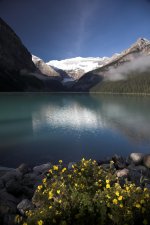
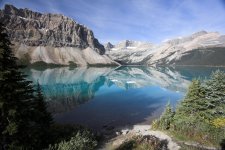
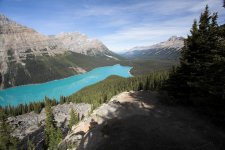
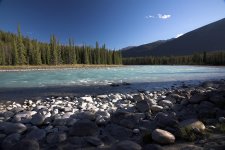
I've used our new upload pictures feature to show off a few of my pictures from the Canadian Rockies

Please click the pictures to view larger. Click again to return to normal view.
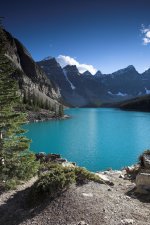
IMG_1350-01.jpg


IMG_1407-01.jpg


IMG_1488-01.jpg


IMG_1518-01.jpg


IMG_1665-01.jpg

Hope you like them. See the how to thread and start using our upload system for your own threads.

viewtopic.php?f=18&t=2850
 
I've just tried a mock post loading up pics on a separate window on my 'pooter and the new facility worketh a treat. Well done to all who sorted it out - Rob
 
Thanks Gill.

These pictures are from 2007. I have been back since but the weather meant the more recent pictures were not as good. Sunny sky and light winds for glassy lakes were not to be found second time around.

I did make a gallery site years ago. It has been neglected for a long time and looks really clunky compared to modern software but it is still there and working.

http://www.argand.co.uk/album/main.php?g2_itemId=921

I'd suggest using the 'view slideshow' link If you want to see them all.
 
Robert":jmlwlfju said:
Thanks Gill.

These pictures are from 2007. I have been back since but the weather meant the more recent pictures were not as good. Sunny sky and light winds for glassy lakes were not to be found second time around.
There was a very good programme on BBC2 last night about the Rockies, part of which included the way the weather can change almost instantaneously - Rob
 
Beautiful photos Robert :eusa-clap: is that a Potentilla in the second one, I remember that being a favourite plant of my dad
 
All I know about Potentilla is what google can tell me and yes it certainly looks the same.

I was standing on the edge of the grounds of a hotel which dominates one end of Lake Louise so I guess it is part of their planting. well spotted!
 
Just testing the new piccie facility with a few from our travels.

Here's one of Saigon at night.

Saigon at night.jpg

Lanter seller, Hoi An

lantern seller, Hoi An.jpg

Pushkar Camel Fair

Pushkar camel fair 1.jpg

Angels Landing, Zion National Park.

DSC02898-2.jpg
 
Gawd Robert, your Rockies photos brought back memories! Moraine Lake, Lake Louise, Mount Edith Cavell, then down Puget Sound. Arrgghh...want to go back!

Sam
 
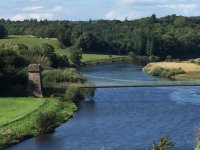
I can do bridges
IMG_20170716_135332113.jpg

Question for the Mac users. When in Photos how can I quickly find the location of the image. I mean it's file location, folder etc?
 
Andyp":oanozp6q said:
I can do bridges


Question for the Mac users. When in Photos how can I quickly find the location of the image. I mean it's file location, folder etc?

Not sure it's that easy. Isn't it stored in a database ? What are you trying to achieve ?
 
Roger, when posting images for the forum the normal routine is to take them with the phone, upload to a dumping folder called AndypImages then either load to a hosting site or or use the upload picture feature.
Rarely do images destined for the forum end up in Photos which is reserved for the family stuff.

With that image of the bridge over the Susquehanna River I could only find it by looking in Photos. Finding the actual location or searching for it using the Upload Picture Browse box is not, for me straight forward nor easy.

Thinking about it further finding the file name is easy and using that to search in the finder like window that pops up when the Browse button is selected should be easy enough.
 
Andyp":2qfys52w said:
I can do bridges


Question for the Mac users. When in Photos how can I quickly find the location of the image. I mean it's file location, folder etc?


Andy, ( Mac Mini) I've struggled with the apple logic too, but I use this from Apple Discussions.

Go to Photos Menu -> Preferences -> General. Click the "Show in Finder" button in the dialog box. Right-click and select "Show Package Contents", this will show a directory listing. Select and open the folder named "Masters"

HTH
 
I also use a good program called EasyFind or could you use Spotlight ?
 
Photos on the iPhone gives date and location though if you use photos taken elsewhere it's the date when you transferred them.

Rod
 
Back
Top