• Hi all and welcome to TheWoodHaven2 brought into the 21st Century, kicking and screaming! We all have Alasdair to thank for the vast bulk of the heavy lifting to get us here, no more so than me because he's taken away a huge burden of responsibility from my shoulders and brought us to this new shiny home, with all your previous content (hopefully) still intact! Please peruse and feed back. There is still plenty to do, like changing the colour scheme, adding the banner graphic, tweaking the odd setting here and there so I have added a new thread in the 'Technical Issues, Bugs and Feature Requests' forum for you to add any issues you find, any missing settings or just anything you'd like to see added/removed from the feature set that Xenforo offers. We will get to everything over the coming weeks so please be patient, but add anything at all to the thread I mention above and we promise to get to them over the next few days/weeks/months. In the meantime, please enjoy!

SketchUp plug-in error

RogerS

Moderator
Staff member
Joined
Jul 21, 2014
Messages
15,569
Reaction score
1,293
Location
Somerset
I use the Cut List plug-in and have just discovered that it gets its knickers in a twist if you have a model (like my lantern) with a component that is on the diagonal like a hip rafter. Cut List seems to give the dimensions of the bounding box (if that's the right word) rather than the actual component which goes from the top of one corner of the box down to the opposite diagonal bottom corner.

Of course, it could be down to me using an out-of-date plug-in and/or version of SketchUp !
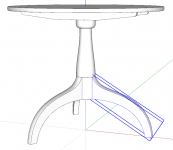
 
Cut List seems to give the dimensions of the bounding box

That's what CutList is intended to do. And yes, that's the right term.

The correct process is to set the component's axes so they align with the geometry. Like so:
Screenshot - 4_6_2019 , 7_39_55 AM.png

Right click on the component and select Change Axes. Then click to set the origin followed by the red, and finally the green axis. Blue takes care of itself. Depending on the geometry, you may find it useful to set out some guidelines to follow while adjusting the axes.
 
Many thanks for the explanation, Dave. You make it sound so easy but I'm afraid that I've failed miserably. But not to worry...I simply used the Tape Measure.
 
You could send me the SKP file. I can create something to show you how to do it.
 
Dave R":jxss7elm said:
You could send me the SKP file. I can create something to show you how to do it.

Many thanks, Dave...will do. I did have another go and thought I'd cracked it but the Cut List dimensions didn't tally with the Tape Measure.
 
Back
Top