• Hi all and welcome to TheWoodHaven2 brought into the 21st Century, kicking and screaming! We all have Alasdair to thank for the vast bulk of the heavy lifting to get us here, no more so than me because he's taken away a huge burden of responsibility from my shoulders and brought us to this new shiny home, with all your previous content (hopefully) still intact! Please peruse and feed back. There is still plenty to do, like changing the colour scheme, adding the banner graphic, tweaking the odd setting here and there so I have added a new thread in the 'Technical Issues, Bugs and Feature Requests' forum for you to add any issues you find, any missing settings or just anything you'd like to see added/removed from the feature set that Xenforo offers. We will get to everything over the coming weeks so please be patient, but add anything at all to the thread I mention above and we promise to get to them over the next few days/weeks/months. In the meantime, please enjoy!

Starlink query

AJB Temple

Sequoia
Joined
Apr 15, 2019
Messages
7,843
Reaction score
1,310
This is really a question for Mark (who has been here), but others may know. We still don't have fibre optic connected all the way to our rural house so we finally had Starlink installed as they dropped the South London premium charge. We can cancel at any time. We paid for a professional install (quite the rudest person we have encountered for a while) and he insisted that he install it on the roof of our larder - a room beyond our restaurant and at the far east end of the building. This was because he said trees inhibited the satellite path anywhere else. As a result we get superb signal at one end (the least useful end) and none at the other. The vodafone system is high up at the far west end. The building is two barns joined together by an intermediate piano room I built, so it is maybe 40+ yards long end to end at a guess.

I see that Starlink repeaters can be bought fairly cheaply and they pair automatically. Would this create an effective mesh system? Has anyone tried it?

Our plan was to dump vodafone broadband and replace with Starlink.
 
We've got some friends in Wales who have Starlink and they've bought a few repeaters to use as a mesh. They said it was really easy to set up and has worked really well.

We're about to migrate to Starlink too (but I'm installing it myself), but we already have a mesh set-up so we're just wiring the main mesh router with an ethernet cable to the Starlink system.
 
Adrian I can’t answer your question as I know little about the técnica side, but we have Starlink and it feeds two homes.
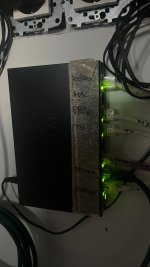
Basically the cable from the Starlink router then does to a box named netgear, from there cables go of to different machines and routers and give us excellent coverage.
Will post an image of the netgear distribution box, hope it helps, if not sorry, I’m a tech dinosaur
IMG_1160.jpeg
 
Hi Adrian

So you have a few options, some will be more palatable than others. Suggestions in order of 'best' to 'worst' (in terms of ease/technical preference...

1. Move it! Simple, get it moved to where you want it, assuming the signal isn't as he says. This is easy to test, but you'd probably need someone to do it for you because if memory serves you're not the best/domestically prohibited from being up ladders... Basically, get up to the point you'd rather have it, open the Starlink app, use the sky scanner tool within to tell you what the sky visibility/signal is like in that area. You can then decide to trim the trees to assist, or accept he was right in the first place (I make no judgement on that).
2. Route ethernet from where the Starlink router is now, to where you want the best signal strength, add repeater/some other kind of AP there.
3. Utilise one or more un-wired repeaters (either Starlink or, probably preferably, another third party) to daisy chain the signal from where it is to where you need it. Beware of this though, every hop will almost certainly degrade the overall available bandwidth more and more.

I use Ubiquti/UniFi hardware for my router and AP's, and only use the Starlink router in modem only/bypass mode, which gives me far more control over my signal etc, and means if I do put AP's up I can run them off PoE switches, meaning no need to additional power cables to the AP's, only a single ethernet to provide both power and signal.

Option 1, along with UniFi internally to provide the signal would be my absolute preference, if you can make it work. Option 2 is next best, and I would still use UniFi rather than trying to make the Starlink repeaters work (if memory serves you can only have 3 mesh nodes (main router and 2 repeaters) before performance degrades. This doesn't sound to me like it will cut the mustard.

Happy to discuss on the phone if you want to go through any more detail.
 
Here's a thought.
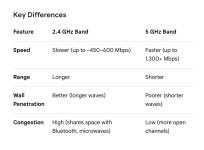
Do you need 5ghz wifi throughout the whole house? The starlink router can have 5ghz and 2.4ghz networks running at the same time. 2.4ghz has, if I understand correctly, a longer range.
I have split our Starlink router as we have an old windoze laptop that couldn’t be upgraded to accept 5ghz. 450-660 mps is fine for most non gaming not streaming uses.
Key Differences
IMG_5150.jpeg

 
Not sure if this is remotely relevant but I had my fiber cable repaired recently after someone chopped through it with a hedge trimmer. The chap from youfibre was nice and even sorted out my spaghetti mess of wires at the router/sky etc in the living room. Anyway I got talking about gaming on my laptop and how it struggles via the wifi upstairs. He said you can use the earth on your house sockets as a hardwire broadband.
 
Back
Top