• Hi all and welcome to TheWoodHaven2 brought into the 21st Century, kicking and screaming! We all have Alasdair to thank for the vast bulk of the heavy lifting to get us here, no more so than me because he's taken away a huge burden of responsibility from my shoulders and brought us to this new shiny home, with all your previous content (hopefully) still intact! Please peruse and feed back. There is still plenty to do, like changing the colour scheme, adding the banner graphic, tweaking the odd setting here and there so I have added a new thread in the 'Technical Issues, Bugs and Feature Requests' forum for you to add any issues you find, any missing settings or just anything you'd like to see added/removed from the feature set that Xenforo offers. We will get to everything over the coming weeks so please be patient, but add anything at all to the thread I mention above and we promise to get to them over the next few days/weeks/months. In the meantime, please enjoy!

Stopping 'faces' appearing

RogerS

Moderator
Staff member
Joined
Jul 21, 2014
Messages
15,241
Reaction score
981
Location
And off to pastures new
If that's the right term.

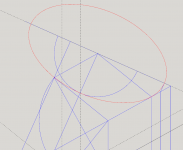
When you enclose a space with, say, a circle then the inside will go blue or white. But you can select and delete it leaving just the outline of the circle. Which is what I need for the staircase tangent drawings that I'm doing at the moment.

But is there a way to prevent that happening at all ?

TIA
 
If you delete the 'space', Roger, leaving just the circle, you can 'make group' the circle, so it is an entity in its own right.... I think.
 
I thought Roger was going paranoid at first...then realised it's a coded convo about CAD...I think...what if it isn't? :shock: What have I started? :shock: When will it end? :shock: Where can I go to get away from it? :shock:

:D Sam
 
Malc2098":1bprwxg1 said:
If you delete the 'space', Roger, leaving just the circle, you can 'make group' the circle, so it is an entity in its own right.... I think.

Groups are verboten ! Components Rule KO ?
 
Roger, SketchUp is a surface modeler so there isn't anyway to prevent faces from being created. You can however prevent them from showing by changing the face style to Wireframe. Either edit the style or go to View>Face Style and choose it.
 
You might also consider using X-ray which would let you see through the faces.
 
Thanks, Dave. I thought of x-ray and dismissed it....but I was thinking 3d. My drawings are in 2d so no problem.

I tell you something for nothing....this tangent drawing is fair doing my head in.

But SU is bloody useful .. :D
 
Did you try Wireframe?

There's a lot of weird stuff going on. You might consider changing the Edge color to By Material and then apply materials to the edges as you go. And make sure you continue maintaining separate between sets of edges so they don't interact and intersect.
 
Wireframe works a treat although I don't seem to e able to make a component when in that mode.

I couldn't find Edge color to By Material in my version of SU (2017).

TIA, Dave
 
I just made a component in wireframe view OK.

I treble clicked the outline of a circle then right clicked and made component. The invisible face of the circle appeared as a dotted surface when selected. Treble clicking selects all connected items so maybe you aren't selecting enough for the component if you are just clicking on single items?
 
As Robert indicated you should be able to make a component in Wireframe. With the faces not displayed you have to do your treble click on an edge since there are no visible faces to click on. Alternatively you could drag a selection box around the geometry to select it.

As for the By Material thing, go to the Styles panel and choose the In Model styles by clicking on the small house icon. Select the style and click on the Edit tab. There's a row of cubes running across the panel under the Select, Edit, and Mic tabs. Click on the leftmost cube which is displayed in wireframe. Change the color at the bottom of the Edge settings.

Screenshot - 3_31_2021 , 6_38_21 AM.png

Screenshot - 3_31_2021 , 6_39_56 AM.png
 
Think that just means selecting 'by material'.

Just tried it and drew a circle and dragged a colour material onto it so it went orange. in wireframe view I now have an orange circle instead of black.

Something else i've learned :)
 
Robert":963sabmb said:
Think that just means selecting 'by material'.

Just tried it and drew a circle and dragged a colour material onto it so it went orange. in wireframe view I now have an orange circle instead of black.

Something else i've learned :)

Did you have to use the Paint Bucket icon ?
 
Robert":13ipbu9r said:
Yes. paint bucket is 'material'.

OK..thought so..just checking I wasn't missing a trick !

Do you happen to know if the SU menus are configurable ? I'd like to get Protractor on the 'top' line, as it were.
 
Seems you can as i just did it.

Not sure if all this is necessary but..

Right click the menu and choose toolbars....then i selected 'large tool set' which is the one i use....Whist it is selected click on the protractor and a black border appears around it... now it can be dragged to where you want it.

guess you'd have to select whatever tool set you are using if not the same as me.
 
Back
Top