• Hi all and welcome to TheWoodHaven2 brought into the 21st Century, kicking and screaming! We all have Alasdair to thank for the vast bulk of the heavy lifting to get us here, no more so than me because he's taken away a huge burden of responsibility from my shoulders and brought us to this new shiny home, with all your previous content (hopefully) still intact! Please peruse and feed back. There is still plenty to do, like changing the colour scheme, adding the banner graphic, tweaking the odd setting here and there so I have added a new thread in the 'Technical Issues, Bugs and Feature Requests' forum for you to add any issues you find, any missing settings or just anything you'd like to see added/removed from the feature set that Xenforo offers. We will get to everything over the coming weeks so please be patient, but add anything at all to the thread I mention above and we promise to get to them over the next few days/weeks/months. In the meantime, please enjoy!

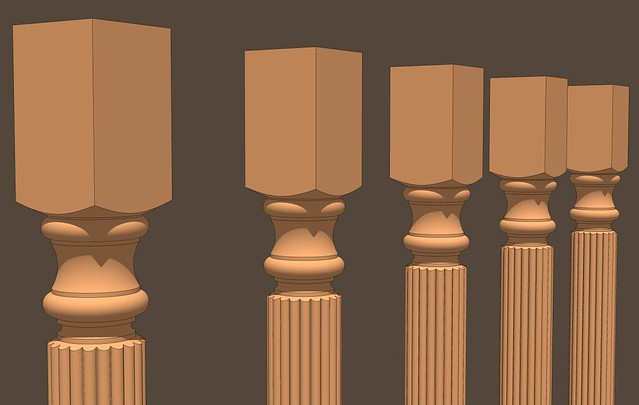
[SU_TUT] Pommels and Transitions From Square to Round

Dave R

Sapling
Joined
Jul 22, 2014
Messages
320
Reaction score
8
I don't know if you folks who are interested in SketchUp look at the blog posts I do on the Design. Click. Build. blog at FineWoodworking.com. If not, here's something you might find useful. It shows making the transition from a turned portion of a table leg or column to a square section.

 
Hi Dave

I am looking forward to your SU tips. I place su in the area of dark arts :) as i struggle with it.
 
Feel free to make suggestions. It's helpful for me if I know what you're trying to figure out how to do.
 
Interesting watch.

Think I knew most of what was in it already... except about the scaling up to work on it.

I've come across the problem of things being small (in sketchups normal working method) and scaled up 10 times to avoid hiccups then scaled back down again but thought it was a pretty specific problem to whatever I was doing at the time. Seems it comes up far more often?

Is it just a matter of looking for things that don't join/work quite right and trying again but bigger or is there a list of actions that will cause problems at 'small' scale and should always be enlarged?
 
Robert":1w7bpikv said:
Is it just a matter of looking for things that don't join/work quite right and trying again but bigger or is there a list of actions that will cause problems at 'small' scale and should always be enlarged?

The issue at small sizes is that holes get left because faces don't get made. If an edge is less than about 0.001 in. SketchUp's tolerance settings cause it to consider the endpoints as one. The funny thing is although SU won't create a face with very short edges, the face can exist if it is made at a larger size.If you have a reason to expect you'll be creating short line segments and might run into the holes issue, scaling up helps you avoid the problem.

You can certainly scale up and scale back down again but you'll want to make sure you use the same scale handle for both directions. Otherwise the thing you're scaling can wind up at a great distance from the origin and potentially the rest of the model. I prefer to leverage components for this kind of thing because whatever I do to the larger copy will be done to the original one. There is no need to scale back down and the original stays exactly where I left it. Some folks prefer to use groups rather than components and for them, the method I use isn't an option.

Here's a video that shows what happens if you are creating the tiny faces and don't take the preemptive step of scaling up.
 
I can't think in inches for small things but 1 thou is a lot smaller than the size of error I was thinking of.

at 21:25 in your original video the glitches from not enlarging first look bigger than 1 thou. Do small inaccuracies cause bigger and hence more visible errors or something?

I'll have a look at the new link soon.
 
Well, if you have a number of consecutive very short line segments you can can get rather large gaps. You can see that very dramatically in the video I linked to in my previous post on chess piece. Look at around 5:30.

That spindle in the first video is only about 18mm square so it isn't very large.

By the way, the most common operations that cause these sorts of tiny face issues are Follow Me and Intersect Faces.
 
Back
Top