• Hi all and welcome to TheWoodHaven2 brought into the 21st Century, kicking and screaming! We all have Alasdair to thank for the vast bulk of the heavy lifting to get us here, no more so than me because he's taken away a huge burden of responsibility from my shoulders and brought us to this new shiny home, with all your previous content (hopefully) still intact! Please peruse and feed back. There is still plenty to do, like changing the colour scheme, adding the banner graphic, tweaking the odd setting here and there so I have added a new thread in the 'Technical Issues, Bugs and Feature Requests' forum for you to add any issues you find, any missing settings or just anything you'd like to see added/removed from the feature set that Xenforo offers. We will get to everything over the coming weeks so please be patient, but add anything at all to the thread I mention above and we promise to get to them over the next few days/weeks/months. In the meantime, please enjoy!

What does a Request Timeout mean on Ping test, Now Starlink,

AndyP

Moderator
Staff member
Joined
Jul 22, 2014
Messages
13,924
Reaction score
1,390
Location
14860 Normandy, France
Battling with my ISP at the moment. Interweb connection up and down faster than a whore's drawers. I'm running ping tests on known websites that are up and running as checked on 3G data on phone.
What does a Request Timeout mean on the ping test?
All the ISP want to tell me is there is no fault on the line which is great but I still can't access the internet and MrsP now forced to go to office.

Will get Starlink on month's appro on Thursday which I hope will solve the problem but would still like to fight the ISP and get the ADSL working.

Knowing more about what I am talking about, re the ping timeouts would help.

Should add that problems persist on WIFI on mobile devices and Ethernet connection on Mac mini. Hard factory reset of router this morning as recommended by ISP not solved the problem
 
I had this a year ago, struggling with ADSL. If you’re on the MIG forum, try ‘pinging’ a chap called Qwakers - he does this sort of thing for a living, and analysed my router and connection all the way from Cornwall!

My travails with BT tech support are documented there too. I spent days trying to get them to switch me to ADSL2+, an improved signal protocol. The various operatives gave me the following responses:

1. What is ADSL2+?
2. No, it’s not available [not true].
3. Can I interest you in BT halo? [nothing to do with ADSL].
4. ADSL2+, you mean the line filter?

It was a bit like a water company not knowing what water pressure is.
 
just that the request is not getting through - or no response is coming back...

when your computer pings another, that computer replies to the ping
so a response timeout - is that the request ping has timed out with no response...

it can mean that there is something not working between you and them...
some computers though are set up to not respond to a ping - so you can't be 100% with what it means
 
Open a command prompt and type

Pint -g 8.8.8.8

Leave that running for 30 mins then ctrl-c to stop I.
Paste the results at the bottom into this chat.

That will run a continuous ping to 8.8.8.8 which is Google’s internet DNS server and we’ll see just what level of packet loss you’re getting.
 
I’m pinging the same websites, bbc.co.uk. Lemonde.fr and free.fr. The last one is the ISP.
Typically everything will be fine for a while than then I get timeouts. I left a ping running for about half an hour earlier on the ISP’s url, 4000 packets transmitted 3000 received 25% packet loss. Been working fine for the past hour or more ( or I would not be able to send this.
 
Open a command prompt and type

Pint -g 8.8.8.8

Leave that running for 30 mins then ctrl-c to stop I.
Paste the results at the bottom into this chat.

That will run a continuous ping to 8.8.8.8 which is Google’s internet DNS server and we’ll see just what level of packet loss you’re getting.
Will do mate,
 
err just tried
Mac-mini:~ andyparsons$ ping -g 8.8.8.8
ping: invalid packet size: `8.8.8.8'
Mac-mini:~ andyparsons$
 
is it me?
Mac-mini:~ andyparsons$ ping -t 8.8.8.8
usage: ping [-AaDdfnoQqRrv] [-c count] [-G sweepmaxsize]
[-g sweepminsize] [-h sweepincrsize] [-i wait]
[-l preload] [-M mask | time] [-m ttl] [-p pattern]
[-S src_addr] [-s packetsize] [-t timeout][-W waittime]
[-z tos] host
ping [-AaDdfLnoQqRrv] [-c count] [-I iface] [-i wait]
[-l preload] [-M mask | time] [-m ttl] [-p pattern] [-S src_addr]
[-s packetsize] [-T ttl] [-t timeout] [-W waittime]
[-z tos] mcast-group
Apple specific options (to be specified before mcast-group or host like all options)
-b boundif # bind the socket to the interface
-k traffic_class # set traffic class socket option
-K net_service_type # set traffic class socket options
--apple-connect # call connect(2) in the socket
--apple-time # display current time
--apple-print-id # display echo ID
--apple-print-req # display echo request
Mac-mini:~ andyparsons$
 
Ah I see -t is continuos ping prompt for windows, on mac continuos ping is the default. Currently running ping 8.8.8.8 . first 20 seqs were fine, seqs 21-45 timed out. I'll report pack results in 25 mins.
 
Here are the stats after 30 mins pinging 8.8.8.8
--- 8.8.8.8 ping statistics ---
1913 packets transmitted, 1889 packets received, 1.3% packet loss
round-trip min/avg/max/stddev = 22.119/25.031/1622.653/39.984 ms
Mac-mini:~ andyparsons$
Apart from the timeout at seq 21-45 all went well and a 1.3% packet loss is a lot less than the 25% I was getting earlier pinging the ISP as seen here:-
--- free.fr ping statistics ---
513 packets transmitted, 326 packets received, 36.5% packet loss
round-trip min/avg/max/stddev = 21.270/92.688/3458.052/344.724 ms
Mac-mini:~ andyparsons$

Does this point to a local cabling issue ie within the house, or issues between house and the ISPs servers and beyond ?
 
Ah I see -t is continuos ping prompt for windows, on mac continuos ping is the default. Currently running ping 8.8.8.8 . first 20 seqs were fine, seqs 21-45 timed out. I'll report pack results in 25 mins.
Ah feck, sorry I forgot you were on a Mac!
 
Here are the stats after 30 mins pinging 8.8.8.8
--- 8.8.8.8 ping statistics ---
1913 packets transmitted, 1889 packets received, 1.3% packet loss
round-trip min/avg/max/stddev = 22.119/25.031/1622.653/39.984 ms
Mac-mini:~ andyparsons$
Apart from the timeout at seq 21-45 all went well and a 1.3% packet loss is a lot less than the 25% I was getting earlier pinging the ISP as seen here:-
--- free.fr ping statistics ---
513 packets transmitted, 326 packets received, 36.5% packet loss
round-trip min/avg/max/stddev = 21.270/92.688/3458.052/344.724 ms
Mac-mini:~ andyparsons$

Does this point to a local cabling issue ie within the house, or issues between house and the ISPs servers and beyond ?
Hmmmm, so 1.3% packet loss on ADSL isn't awful, not ideal but not awful given what we know about the geography of your cable, but those blocks of 25-25% packet loss are clearly not good.

What is your ADSL router? The easy way to prove where the issue is is if you can log onto the GUI of the router and run a connection test from there. That will take all the local Wi-Fi and cabling out of the equation and will prove that the issue is somewhere from the router to the ISP. That could then be router itself, any internal cabling from router to ADSL connection, then the external wiring.
 
The bit at the bottom might help, Andy. I just googled.

AI Overview


The "Série Spéciale Freebox Pop S" is a specific internet service offer from the French ISP Free that provides
internet and calls but explicitly does not include TV services. Therefore, there is no built-in Graphical User Interface (GUI) on the Freebox itself for watching or managing TV series.
The service focuses solely on high-speed internet (Fiber with Wi-Fi 7) and unlimited calls.
To watch or manage series, you will need to use alternative methods:

Options for Watching Series
  • Streaming Services: You would need subscriptions to streaming platforms like Netflix, Disney+, etc., and access them via compatible devices (Smart TV, computer, tablet, etc.).
  • Third-party media players/servers: You can set up a personal media server using software like Kodi or Jellyfin on a separate device to organize and play your own media files.
  • Computer Software/Apps: You can download shows or use a screen recording software on your PC/Mac for personal use (subject to copyright laws).

Managing Your Freebox Settings
While there's no TV GUI, you can manage your Freebox's internet settings via the Freebox OS web interface.
  • Access the interface by typing http://mafreebox.freebox.fr/ or your custom [custom_name].freeboxos.fr URL into a web browser on a device connected to your Freebox network.
  • This interface allows you to manage settings like Wi-Fi, network configuration, and potentially a local FTP server for file storage.
 
Yep what he said above!

If that doesn't work then the other option is find out what your subnet default gateway address is from your network settings and try to connect to that IP address in your browser.

Screenshot 2025-12-09 at 14.28.16.png
 
Cheers Malc,
that has given access to whole lot of data that I do not understand, the tech language not that it is in French. for example.
Cant see how I can run a ping from here rather than the Mac itself or even if this data should be on a public domain

Screenshot 2025-12-09 at 3.55.03 pm.png
 
While I was out I left a ping 8.8.8.8 running. As well as the usual Request timeouts it also showed up a few:-
ping: sendto: No route to host
and even :-
ping: sendto: Network is down
I sent an extract of the PING data to the ISP
ISP tell me there network people are looking at it.

I have not got a clue and can only hope that the Starlink kit due on Thursday will give us some semblance of reliability
 
They’ve got issues at ISP, I’d say mux issues or something.

Starlink will sort you out mate, I promise! As much as I think Musk is a lunatic and dangerous as Lucifrr himself, Starlink is the dogs danglies!
 
Mux = Multiplexor, just looked it up. Makes my head hurt just reading about it.:(
Starlink on trial should let the missus work from home over busy year end; providing I can locate and run cables without drilling holes in wall or ceiling.

I am going to use the Shawshank Redemption method of sending the ISP ping data every time it goes down, I'll bombard them until they get it sorted.
 
Don’t you just love the standard IT support mantra…..”It’s all OK this end”.

Currently battling with Lloyds Bank online support as I am supposed to be able to see our home insurance policy when logging in to internet banking. I can’t. Been ongoing for many months now and well outside the time limit for a resolution but haven’t got the energy to escalate.
 
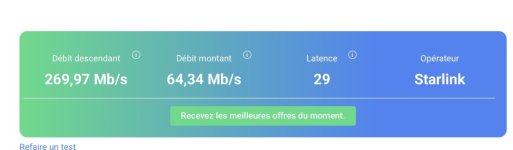
Starlink delivered a day early.
Jury rigged the “dish” and ran the cable through the garage window with router in garage too which as you can see is underground.
IMG_4578.jpeg
Wifi speed test in living room which is behind the arbor

IMG_4576.jpeg

And on ISP Adsl

IMG_4577.jpeg

Reliability is more important to us than speed And I have to get wifi into the bedroom top right of first image but initial test is pleasing
 
Starlink delivered a day early.
Jury rigged the “dish” and ran the cable through the garage window with router in garage too which as you can see is underground.
View attachment 37476
Wifi speed test in living room which is behind the arbor

View attachment 37477

And on ISP Adsl

View attachment 37478

Reliability is more important to us than speed And I have to get wifi into the bedroom top right of first image but initial test is pleasing
Good stuff. Best solution for ADSL problems is to ditch it, as I’ve found as well. It’s basically a bodge job, trying to piggy-back complex signals onto an ageing, corroding network that was never designed for it. My internet connection varied between crap and non-existent.

I must have had 5 Openreach engineer visits, playing about with SNR ratios and interleaving, and was about to get Starlink when they announced a fibre connection (FTTP) was to be installed. Night and day.
 
Good stuff. Best solution for ADSL problems is to ditch it, as I’ve found as well. It’s basically a bodge job, trying to piggy-back complex signals onto an ageing, corroding network that was never designed for it. My internet connection varied between crap and non-existent.

I must have had 5 Openreach engineer visits, playing about with SNR ratios and interleaving, and was about to get Starlink when they announced a fibre connection (FTTP) was to be installed. Night and day.
Openreach checker finally changed from 'Not available' to 'We'll be building in this area in the next year.' so I'm hoping that this time next year I'll hopefully be able to swap Starlink out for a full fibre connection...
 
Openreach checker finally changed from 'Not available' to 'We'll be building in this area in the next year.' so I'm hoping that this time next year I'll hopefully be able to swap Starlink out for a full fibre connection...
Up here it was quite complicated - one team to brought the fibre to the main road, another took it past the house, then Openreach themselves made the actual connection to the ONT.

If you’re looking for a decent ISP, I can strongly recommend Andrews & Arnold, a small independent. Tech support is a bloke at a desk who knows the internet inside out, but didn’t necessarily attend charm school, but that suits me just fine. They also give you software with lots of technical data and metrics, and the ability to run your own line tests.
 
Up here it was quite complicated - one team to brought the fibre to the main road, another took it past the house, then Openreach themselves made the actual connection to the ONT.

If you’re looking for a decent ISP, I can strongly recommend Andrews & Arnold, a small independent. Tech support is a bloke at a desk who knows the internet inside out, but didn’t necessarily attend charm school, but that suits me just fine. They also give you software with lots of technical data and metrics, and the ability to run your own line tests.
Thanks, will have a look, but don't know that they'll have presence in Warrington, but I'll look...
 
Wifi wont reach from garage to Mrs P's office . If I place router in living room and run cable through open door WIFI is great.
Our existing cabling runs up through the garage ceiling to living room above and the starlink cable will reach so a single hole in the floor and I can have Starlink router in living room. Much better option then drilling through external wall. Will do this later in week.

So long as this gets us through busy year end we'll be happy. I will still force the fibre issue with ISP as having internet relying on a nutcase entrepreneur is one step too far me nd rightly or wrongly I will be happier with a fixed cable connection than satellite.

mega thanks to Mark for encouraging me down this route.
 
Thanks, will have a look, but don't know that they'll have presence in Warrington, but I'll look...
They’re in Bracknell and Ebbw Vale, but have no problem providing internet all the way up here, so you should be ok. It’s their solving of problems that sets them apart, for me.

Now, initially, my fibre internet was going down between about 6pm and 11pm every day. Once, it was off all night and stayed off. I contacted A&A via IRC chat (remember that?!) on a Saturday and the techie determined that my router was being scrambled.

He asked if I had any sources of interference, eg lighting systems. I said no, but had a look round - I’d left a light on all night, and the pattern of failures matched when it was on and off.

It was an old-fashioned leading-edge dimmer switch trying to run dimmable LEDs and emitting RFI at certain settings. Swapping the dimmer sorted it. I’d say there’s no way BT would have solved that, certainly not after 20 minutes like this chap did. I’d have got some dimwit telling me to move the router or trying to sell me a new one. 20 days, more like.
 
They’re in Bracknell and Ebbw Vale, but have no problem providing internet all the way up here, so you should be ok. It’s their solving of problems that sets them apart, for me.

Now, initially, my fibre internet was going down between about 6pm and 11pm every day. Once, it was off all night and stayed off. I contacted A&A via IRC chat (remember that?!) on a Saturday and the techie determined that my router was being scrambled.

He asked if I had any sources of interference, eg lighting systems. I said no, but had a look round - I’d left a light on all night, and the pattern of failures matched when it was on and off.

It was an old-fashioned leading-edge dimmer switch trying to run dimmable LEDs and emitting RFI at certain settings. Swapping the dimmer sorted it. I’d say there’s no way BT would have solved that, certainly not after 20 minutes like this chap did. I’d have got some dimwit telling me to move the router or trying to sell me a new one. 20 days, more like.
That's impressive troubleshooting.
 
Wifi wont reach from garage to Mrs P's office . If I place router in living room and run cable through open door WIFI is great.
Our existing cabling runs up through the garage ceiling to living room above and the starlink cable will reach so a single hole in the floor and I can have Starlink router in living room. Much better option then drilling through external wall. Will do this later in week.

So long as this gets us through busy year end we'll be happy. I will still force the fibre issue with ISP as having internet relying on a nutcase entrepreneur is one step too far me nd rightly or wrongly I will be happier with a fixed cable connection than satellite.

mega thanks to Mark for encouraging me down this route.
How much is it costing you, Andy?

We lost internet for all of yesterday and it really brought it home to both of us just how critical internet access is these days as we both use it a lot throughout the day. So early doors this morning I started looking for a backup. Starlink is too expensive as a backup at £55 a month. BT Openreaach will give us a guaranteed…..stop laughing at the back there….1Mbps but at £39.99 a month pointless.

Mobile coverage has yet to reach Somerset and so that is ruled out. Any other suggestions I’ve missed?
 
We use bentleytelecom.com for satellite (Viasat I think, not Starlink). Our original company went bust and Bentley took over the customers so that’s why we’re with them. We’d already been grandfathered in when the previous biz switched to commercial customers only. I’ve never dealt with Bentley in any way except for paying the bill which is about half the price of Starlink (our speeds are also slower, but still fine for our use). I think Bentley sell Starlink so if you just call asking for satellite they’ll probably push that, but I guess it’s possible that if you ask for other, cheaper satellite options, they might have something else to offer. Don’t know.
 
Starlink standard kit on what is called here Residential Lite
€29 euro per month.
Very much on a trial basis at the moment. Still testing. Just connected Amazon Prime on TV and streaming video which seems fine. I will move the router out of the underground garage and into the house proper at the weekend which should give us wifi all round the house, this was tested with cable running through an open door..
As I said earlier we need reliability more than speed, 20mbs on adsl, has served us well enough. Sods law of course the ADSL has not gone down since the Starlink installed, MrsP worked from home yesterdaybon the existing ADSL wifi without a problem….first time in weeks.
You will need a clear view of the sky towards the NW.
Will be extreme weather dependant of course.

IMG_4579.jpeg

IMG_4580.jpeg
 
Last edited:
I wouldn't worry about weather Andy, I've had mine, as you know, for about 2 years now and there hasn't been a single weather event that's caused us an issue. Storms, snow, wind, rain, even thunder/lightning haven't impacted signal or connectivity.

That's in stark contrast to my old wet string ADSL which would be 19Mbps on a still sunny day and drop to 15/16Mbps at the merest hint of rain or breeze!
 
Hope so. We have Freesat for TV and that does suffer in severe weather but then only one Satellite to point to I suppose. We are more likely to have a power cut.
 
Oh rats !
You can check this Roger, download the Starlink app, there's a sky checker in there where you stand on a ladder or wherever you would mount the dish, and move your phone around showing it a view of the sky. It then tells you whether it will work in that location.

Don't believe you need a Starlink account to use it.
 
You can check this Roger, download the Starlink app, there's a sky checker in there where you stand on a ladder or wherever you would mount the dish, and move your phone around showing it a view of the sky. It then tells you whether it will work in that location.

Don't believe you need a Starlink account to use it.
you don't . Dishy McFlatface can also be mounted on a pole so could be a metre or two higher than you can reach on a ladder.
 
Back
Top