• Hi all and welcome to TheWoodHaven2 brought into the 21st Century, kicking and screaming! We all have Alasdair to thank for the vast bulk of the heavy lifting to get us here, no more so than me because he's taken away a huge burden of responsibility from my shoulders and brought us to this new shiny home, with all your previous content (hopefully) still intact! Please peruse and feed back. There is still plenty to do, like changing the colour scheme, adding the banner graphic, tweaking the odd setting here and there so I have added a new thread in the 'Technical Issues, Bugs and Feature Requests' forum for you to add any issues you find, any missing settings or just anything you'd like to see added/removed from the feature set that Xenforo offers. We will get to everything over the coming weeks so please be patient, but add anything at all to the thread I mention above and we promise to get to them over the next few days/weeks/months. In the meantime, please enjoy!

What does Java provide these days in a win 10 world?

9fingers

Moderator
Staff member
Joined
Jul 21, 2014
Messages
10,414
Reaction score
165
Location
Romsey Hampshire between Southampton and the New F
Going back decades it seemed that various programmes and functionality needed Java to be installed to make them work.
I never understood the what and why but went along with it updating Java when asked to.

I got a "new version available" pop up today which lead to the following message.
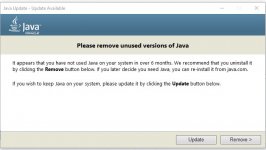
java notice.jpg

That suggests I don't need it. Does this mean it is truly redundant or am i going to regret deleting it?

Any insights?

TIA
Bob
 
You need java if you have any java-based applications installed (that don't come with a bundled copy of java).

They changed the licensing for java a couple of years ago and they probably want to stop people using the older versions (which are subject to the older licence). That's my best guess as to why you might be getting that message.

I don't know how common Java applications are these days. The main advantage (as far as I'm aware) is that a single compiled binary can (in theory at least) run on any desktop operating system. I used it (technically I used Kotlin, a java-based language) to create an application. The reason I used a java-based language is that the same core code runs on Windows, Linux and also on my Android phone. I use that application every single day, so I'm not going to get rid of java any time soon, but if you don't use applications that are based on java, you don't need java installed.

Probably too much detail in all of that.

Short answer: uninstall it. If you find you need it for an application you have installed, you can always install it again.
 
Java not to be confused with Java script required the end user to install the Java SDK. This made it easy for developers to write applications but Java really did fall out of fashion years ago, first there was a security scare and then Apple stopped support.

Me personally I would removed it as it is very unlikely to be required and if a program does require it maybe it has not been updated for security patches


Sent from my iPad using Tapatalk Pro
 
What Dr. Al said - if you don't know why you need it, chances are 99% that you don't. If it turns out you do, you can always install it again.

While there are still desktop applications being written in it, they generally bundle the runtime in their installer - while the "run anywhere" promise applies to multiple operating systems and hardware platforms, it doesn't apply to multiple versions of the Java runtime, so any vaguely complex application will ship the version that they know works and not support using any other.
 
Thanks all. As the message says I’ve not used Java in the last 6 months it is pretty likely I’ll not need it in the next 6
I’ll take it off the laptop which is mainly email, surfing, YouTube plus open office docs so nothing too taxing

I’ll possibly leave it on the office desktop machine which get used for drawing and cut list optimising which might just need it.

Bob
 
9fingers":1fc90f67 said:
Thanks all. As the message says I’ve not used Java in the last 6 months it is pretty likely I’ll not need it in the next 6
I’ll take it off the laptop which is mainly email, surfing, YouTube plus open office docs so nothing too taxing

I’ll possibly leave it on the office desktop machine which get used for drawing and cut list optimising which might just need it.

Bob

Just a "in case you're interested" having read your list: Open Office is written in Java (as is LibreOffice). However, as @spb said, applications like that are complex enough that they come bundled with the java runtime, so you don't need it installed separately to use them.
 
clogs":khp1b99p said:
Thought u ment the spice island…
Hahaha. Must get out more…

Same - my very first thought was 'Coffee.....'
 
I am on W11
Standard Bank recently released their new Business Online Banking with better security etc.
Must have received at 6 least e-mails advising of the change, as usual half a read, then just filed them under Retreat-Estate.
1 July arrived, new software date.
I usually wait a week or so before logging in and downloading all the statements.

When loading B-Online from my http://WWW.links it downloads a JNPL file, double click and launches the bank application.
Error - no software recognises this type of file.
The message was to download the latest version of Java, then load the http://WWW.bank site, download the new online banking desktop app.
Downloaded Java, very quick installation, same with bank app.
Works! :D :D
Now have an App on the laptop for the bank.
 
That is very interesting Phil. Just the sort of thing I used to experience with several differ software items that would pop up saying "please install Java"
I think I'm correct in saying that UK banks tend to only use web access on PC/Mac platforms and only have custom software eg an app for smartphones.

Annoyingly (at least to me!) the Apps only offer a subset of the functionality available via their website eg for one of my bank accounts I can set up a new standing order on the phone but not cancel an old one.
Logging in via the websites usually use the smartphone app for authentication.
Another account I have (nationwide) is really fussy.
Login to the website, then authenticate by phone and say setting up a new payee, requires further authentication via a debit card in a stand alone hand held reader.

I wonder if UK banks might move towards comprehensive apps to download and run on computers?
I must admit I much prefer to do banking on my PC than small screen smartphone.

Bob
 
9fingers":7ulrxnha said:
I wonder if UK banks might move towards comprehensive apps to download and run on computers?
I must admit I much prefer to do banking on my PC than small screen smartphone.

Unlikely - there are a number of good security-related reasons not to.

Smartphone operating systems are much more locked-down than desktop ones, which not only reduces the likelihood of malware being present but also makes it much easier to insist that client applications are kept up to date. Modern smartphones also have hardware-backed secure storage backed up by biometric authentication, which isn't reliably available for desktop applications.

The browser-based online banking is a compromise for desktop systems; the interface is completely under the bank's control and can be updated at any time without waiting for end users to install new versions, and the extra authorisation steps (phone- or card-reader-based) can go some way towards making up for the deficiencies of the platform.
 
I have only ever used the desktop application and as I am too scroogy :shock: to buy a smart phone, the desktop will be there for a number of years. (some birthday funds were spent and it was a toss up between a new phone or ROS - the sander is more useful)
My phone is a Samsung E212, bought in 2011 for R200, the battery still lasts 8 days between charges.
The time display is large, can read it without the specs 8-)

When I login to my bank:
Username
Password
Every second or third login they will send a OTP to my phone.
As the system logs me in I get an SMS advising that I have "Logged in".
It is far easier and simpler. I see some of our owners with their smart phones struggling sometimes with the small screen and the banking app.

When I make any payments, immediate I get and SMS of the details, or future payments I get an e-mail advising of the payment in 2 days time and then the SMS when the payment is made.
 
Back
Top