• Hi all and welcome to TheWoodHaven2 brought into the 21st Century, kicking and screaming! We all have Alasdair to thank for the vast bulk of the heavy lifting to get us here, no more so than me because he's taken away a huge burden of responsibility from my shoulders and brought us to this new shiny home, with all your previous content (hopefully) still intact! Please peruse and feed back. There is still plenty to do, like changing the colour scheme, adding the banner graphic, tweaking the odd setting here and there so I have added a new thread in the 'Technical Issues, Bugs and Feature Requests' forum for you to add any issues you find, any missing settings or just anything you'd like to see added/removed from the feature set that Xenforo offers. We will get to everything over the coming weeks so please be patient, but add anything at all to the thread I mention above and we promise to get to them over the next few days/weeks/months. In the meantime, please enjoy!

WiFi in a ‘faraday cage’?

Stuart

Sapling
Joined
May 21, 2021
Messages
400
Reaction score
133
Bear with me here, technical numpty!

My workshop is a pitched roof single garage. All walls and roof are insulated with 50mm PIR board with foil taped joints. I use one of those alexa things for music and company during the day.

Garage is about 10 feet from house and due to patchy wifi I’ve installed a booster (also within a well insulated modern extension) with limited improvements.

I want to improve wifi performance if I can but preferably without a wired connection (going to be difficult given terrain). Am I chasing a dream or should I just give up now?
 
External antennas ? 10' seems like a pretty short distance though. Power line ethernet ? If you have mains power to the garage, never used them myself.
 
Bear with me here, technical numpty!

My workshop is a pitched roof single garage. All walls and roof are insulated with 50mm PIR board with foil taped joints. I use one of those alexa things for music and company during the day.

Garage is about 10 feet from house and due to patchy wifi I’ve installed a booster (also within a well insulated modern extension) with limited improvements.

I want to improve wifi performance if I can but preferably without a wired connection (going to be difficult given terrain). Am I chasing a dream or should I just give up now?
You might look into a power line type link, Tapo is a name that springs to mind.
I had a similar problem at our previous house, PIR affected the WiFi and my FM radio. My current shed has PIR in the floor and roof, but the walls are rockwool. Radio and phone work fine, but no WiFi as it's 50m from the house.
 
Mains power circuit adapters do work, but I think they'll struggle with big motors on the same circuit, because of interference. If your enthusiasm is for C18th hand skills, no problem! Otherwise, you probably need to send it as a radio signal to the garage, then re-broadcast it inside the garage. That requires a bit of extra kit (and costs a bit, too).

I know you said you don't want a cable, but that is far and away the best performing and probably most reliable solution, and CAT5 is very inexpensive compared to using a wireless solution. There's no reason you can't bury it, too if you wish., or fly it from building to building over such a short distance (use something like galvanized fencing wire to support the actual CAT5 cable with cable ties).

You can also use a dedicated range-extending pair of devices to work across the gap. Signal "boosters" will give you slow WiFi as they're almost always 'simplex' devices, i.e. signal in one direction at a time (both ways simultaneously is 'duplex' and I've never seen a plug-in-and-go one for domestic use). Proper range extenders just do the job, but by using radio instead of physical cable.

Where, with respect to the garage and modern extension, is your broadband router? I assume it's also providing the WiFi (i.e. from the same box)... Also, do you have neighbours close by (i.e. lots of other WiFi networks in proximity)? Interactions with other households' WiFi can result in your own WiFi being worse than expected.

You can use most mobile devices as pretty useful diagnostic tools. There's a raft of good apps that will show you both your own network's performance, and the 'WiFi environment'. These two are for Android:
  • WIFiman
  • Net Analyser
If there are neighbours close by, I'd start by looking at the environment. Note the channels other networks are using, and which are the 'loudest'.
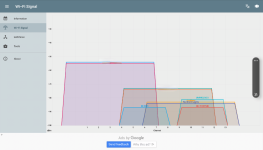
I live in an urban neighbourhood. The screengrab below from my tablet shows the wifi networks detectable from my dining table (using Net Analyser):
WiFi-neighbourhood.png
I've blurred out my WiFi SSIDs ("network names"), but they're the two biggest ones (both my access points use the same two SSIDs, which is why the two trapesiums are almost exactly superimposed). This graph is fiine for this house, as my access points are plenty loud enough in comparison to the neighbours' ones (it gets a bit busier in the evenings and upstairs too, as the signals carry further).

You can see how almost all the neighbours' stuff is centred on band 10 and 11, whereas ours is on bands 3 and 8 (x-axis centre point of the shapes). It means the others probably interfere with each other but we mostly have clean signal (it's a bit more complex, but not much).

Note also the Y-axis scale. Decibels are logarithmic, so in this case a 3dB difference on the Y-axis is a halving or doubling of received power. So my downstairs access point (on channel 3) is roughly 1024 times 'louder' than the neighbour's "northern lights" SSID (if I read that wrong I welcome correction!).

The challenge you'll have is if all the other local networks arrive in the garage on the same channels and with similar signal strength - the ones you don't want are just interference for your own network.

So step1: install something like Net Analyser, and see what you get inside and outside the garage. You should see your own WiFi along with everyone else's. if they're all centred on the same channel (e.g. 11, as my neighbours' ones are), and yours is too, that's not good. If you can't force your extender to use a quieter channel (or there isn't a quieter channel available!), you'll probably continue to have poor performance.

Regarding Faraday cages: their effectiveness varies hugely with frequency. There are usually enough gaps in buildings for signal to get in, but it will be attenuated (made smaller) by large conductive areas of metal foil. Net Analyser should be able to show you the effect - near a doorway (assumed wooden), signals will be louder from outside. You can't blast through the foil, but you can pick up and rebroadcast signal sneaking in round the edges!

Hope some of the above is food for thought!

E.

PS: I'm not a radio frequency engiineer, but I've used specialist radio equipment since long before the internet was a thing, and RogerS will confirm I probably had a reasonable technical education!
 
Stuart, I have a couple of AVM Powerline units that you are very welcome to try. If they do the trick then we can discuss spondoolicks if you like.

Where are you located ?
 
Before buying equipment, do a quick check that you don’t have WiFi blockers between your two locations that you could easily move: ladders, metal shelving, oil paintings with metal pigments, for example. If you do, move them and see what your signal is like after.
 
Thank you for all the helpful responses. Eric, thanks for taking the time to write an understandable response. I’ve tried both the suggested apps and in all honesty I didn’t understand much of what they do. I also think the free versions don’t have the same functionality, so I didn’t get the same graphs.

Roger, thanks for the offer but my understanding is those powerline units have to be on the same circuit to work? The garage is on 6mm armoured feed from the house distribution board while the router is on the ring main. If you know differently I’d be prepared to try (I’m in Somerset).

Whilst I know a wired connection is the ultimate answer it would be too much work to install unobtrusively (we’ve just got rid of a catenary and don’t want another).

Starting to think about DAB with an external aerial although reception here isn’t brilliant.
 
Roger, thanks for the offer but my understanding is those powerline units have to be on the same circuit to work? The garage is on 6mm armoured feed from the house distribution board while the router is on the ring main. If you know differently I’d be prepared to try (I’m
No they don’t need to be.

I am also in Somerset! PM sent
 
Lots of good information above and not a lot I can add, but if you want a distilled answer then I would say, given your situation the only way you're going to guarantee anything like a decent signal is to find a way to run a Cat5/6 cable from house to workshop, fact!

if you really can't/don't want to do that then giving powerline a go is worth a try especially if you can 'try before you buy' from Roger.

Any other attempts to suck it and see will almost certainly lead to monumental frustration and more posts to this thread on why it's so sh!t and how to make it better.

Trust me, I have more than one T-Shirt in this particular space, plus it's my job. I've had the same issues at home, and in every occasion the ONLY solution that has worked with the level of success required has been to run a cable.

Simply put, Wi-Fi, when out in the sticks, with nothing else around to interfere can be great. As soon as you have any kind of other signals in play then it's a poor technology and is as much about luck as knowledge as to whether you can get it to work to its maximum capacity.
 
Last edited:
These guys know more about this stuff than I ever will.
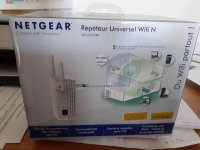
You’ve tried a booster. Have you tried a repeater?
Like this
IMG_4556.jpeg
When I need to get a signal to the workshop here
IMG_4553.jpeg
Which is 30m outside and 5m inside from the router, I hang the repeater ( from an extension lead) close to the barn door (The workshop is in a separate room on the RHS of the barn.
I first tried with the repeater hung on a window in the house which did not work. Which makes me surmise that it is a better receiver of signal than transmitter.
 
Andy,

That’s what I’m currently using. My terminology may be poor in referring to it as a booster.

I find it pretty pants but as I said I’m putting in down lots of foil lined insulation in both the house and the garage.

Hopefully Rogers mains line booster/extender thingies will do the job!
 
Okay, very basically, those things are crap!

A repeater will simply pick up whatever strength of signal it receives, and pump that signal back out at full strength.

Here's an example using Andy's setup (using made up bandwidths for example):

Internet>Router>Repeater>User Device

In the example above the internet speed is 100Mb at the router > the router then puts out 100Mb at 5 bars of Wi-Fi > at the barn the Wi-Fi signal is down to 5Mb speed at 1 bar of Wi-Fi > you place the repeater at the barn which picks up the 5Mb signal and pumps that back out at 5 bars of Wi-Fi.

Now at your end device you can see a lovely full strength signal, but the critical point is, the internet speed is only as good as the weakest part of the signal, which is down to 5Mb. In this scenario you have a stonking 5 bar signal of 5Mb sh1tty speed.

Repeaters are very basic devices and to all intents and purposes, marketing crap unless you have so many of them that they are 10 feet apart all along the route to where you need the signal.

I'm sorry to double down on this but what you are trying to achieve, you are never going to achieve to any level of quality or satisfaction without some Cat5/6 cable at some point along the path. Everything is conspiring against you, distance, materials, sh!tty technology, everything!
 
What Mark said.

We tried loads of different things (including wifi repeaters & powerline type things) to get better wifi.

Then we stopped throwing good money after bad & forked out for three mesh wifi boxes, which are linked together with ethernet cable & spread high speed wifi everywhere we want it.

The mesh wifi things support wifi repeating & powerline as an alternative to ethernet cable, but the improvement we got when the ethernet cable was installed was dramatic, so I can say with some confidence that the single change from powerline to ethernet cable (with no hardware or anything else changing) was well worth it.
 
As I said these guys know more about this stuff than I ever will.
FWIW my interweb download speeds are less than 20mb — still waiting for fibre.
The setup I described above is enough to send and receive WhatsApp messages and video in the workshop and listen to UK radio via VPN on smartphone and BT speaker.
 
Lots of good information above and not a lot I can add, but if you want a distilled answer then I would say, given your situation the only way you're going to guarantee anything like a decent signal is to find a way to run a Cat5/6 cable from house to workshop, fact!

if you really can't/don't want to do that then giving powerline a go is worth a try especially if you can 'try before you buy' from Roger.

Any other attempts to suck it and see will almost certainly lead to monumental frustration and more posts to this thread on why it's so sh!t and how to make it better.

Trust me, I have more than one T-Shirt in this particular space, plus it's my job. I've had the same issues at home, and in every occasion the ONLY solution that has worked with the level of success required has been to run a cable.

Simply put, Wi-Fi, when out in the sticks, with nothing else around to interfere can be great. As soon as you have any kind of other signals in play then it's a poor technology and is as much about luck as knowledge as to whether you can get it to work to its maximum capacity.
So so true! I'm well, was thanks to redundancy an RF Engineer and Radio Network Designer/Network Architect. Old Wifi was more or less the same frequency as Bluetooth, and had 3 (official) channels (11 Tehcnically available) , so with the 3 dBi pancake field antennae interference was RIFE. Narrow Bandwdth (slow speeds) and terrible re-use led to the release of 5.8 GHz which brought technologies to "sniff" channels and also bundle multiple together to get faster throughput (traffic speed on your device), the higher frequency means it doesn't go through as much "stuff" as easily, so walls, windows (especially Low E 0r "K-Glass") will nobble it much more quickly. advantages are many more channels and because of the attenuation much better re-use. Now we have WiFi 7.... (6 GHz) even more speed, and channels etc... but not widely used by many portable devices.

Because I'm THAT pathetic and ridiculous, I built a home network using Ubiquiti stuff with 3 Wireless Points, multiple different networks on different SSIDs with various rules as to what ca see what... essentially becuase I have some smart devices, some security devices, music devices, 3D printing stuff, Network attached storage, Test Networks, Guest Networks.... Etc, I didn't fancy the idea of re-programing everything when/if I switched ISP, so I just have to swap a cable at the CPE/Router.

Even with great coverage maps, and refining channel plans, when I put PIR insulation in my garage, I ended up running a cable and putting another access point in there- fortunately when I wired everything, I made ducts/Risers in my house and included additional draw ropes.

Running an External grade CAT5e/CAT6 cable could even be done overhead with a Catenary wire kit, if that helps?
 
So so true! I'm well, was thanks to redundancy an RF Engineer and Radio Network Designer/Network Architect. Old Wifi was more or less the same frequency as Bluetooth, and had 3 (official) channels (11 Tehcnically available) , so with the 3 dBi pancake field antennae interference was RIFE. Narrow Bandwdth (slow speeds) and terrible re-use led to the release of 5.8 GHz which brought technologies to "sniff" channels and also bundle multiple together to get faster throughput (traffic speed on your device), the higher frequency means it doesn't go through as much "stuff" as easily, so walls, windows (especially Low E 0r "K-Glass") will nobble it much more quickly. advantages are many more channels and because of the attenuation much better re-use. Now we have WiFi 7.... (6 GHz) even more speed, and channels etc... but not widely used by many portable devices.

Because I'm THAT pathetic and ridiculous, I built a home network using Ubiquiti stuff with 3 Wireless Points, multiple different networks on different SSIDs with various rules as to what ca see what... essentially becuase I have some smart devices, some security devices, music devices, 3D printing stuff, Network attached storage, Test Networks, Guest Networks.... Etc, I didn't fancy the idea of re-programing everything when/if I switched ISP, so I just have to swap a cable at the CPE/Router.

Even with great coverage maps, and refining channel plans, when I put PIR insulation in my garage, I ended up running a cable and putting another access point in there- fortunately when I wired everything, I made ducts/Risers in my house and included additional draw ropes.

Running an External grade CAT5e/CAT6 cable could even be done overhead with a Catenary wire kit, if that helps?
I use Ubiquiti at home too, excellent kit.
 
I use Ubiquiti at home too, excellent kit.
If I hadn’t been able to persuade Zen to let us keep all our AVM kit (rather a lot accumulated over the years) when we, reluctantly, left them then I would also have gone down the Ubiquity route
 
Ubiquiti is worth every penny! I have used it at home for about ten years, and recently put a considerably bigger installation into a local Church.

The church one has four SSIDs ("wireless networks"), and, for various reasons, six virtual LANs (VLANs), and currently three access points doing the WiFi. Given I'm not in the trade any more, nobody was more surprised than me when I configured it on the dining room carpet at home, plugged it in at the church, and everything 'just worked'.

The icing on the cake was that it eliminated the need for the ISPs router completely. The little Openreach box on the wall stays in circuit. That takes actual fibre in and delivers up to 10 GB/s out on a CAT-6 cable. The CAT-6 now plugs straight into the Ubiquiti firewall/router, giving the potential of 10Gb/s (were the ISP to allow this - it's throttled presently, as the contract is cheap). It's cleaner, simpler, faster, and I can keep an eye on the whole system remotely, which is handy.

The other thing I wasn't expecting was that the Zigbee* IoT stuff. It just worked with the Ubiquiti VLAN I'd set up for them. Crucial is the heating control for several zones and three industrial boilers: it's remotely controlled by the caretakers who live nearby, but can't always get to the church to turn the heating on an hour earlier, or whatever. They have a phone app, so in theory can turn the heating on from a beach in Greece (other destinations are available...). I set up an IoT WiFi network, their phone app found it and asked for the password: job done.

There's lots of other good stuff as standard in a lot of Ubiquiti kit. For example the ability to monitor devices on the guest LAN (which sites are visitors surfing to?). The church has an after-school club, that parents can come along to - several use the WiFi to work off laptops while the kids let off steam. It's one reason the guest LAN is there - the church wants to encourage parents - but there are obvious safeguarding concerns too. So they have to agree to being monitored - on first use there's a sign-up screen - and it's automatic thereafter (the system logs MAC addresses). All that functionality is built-in, and easy to set up.

The other area, which I haven't yet explored, is that of physical building security. The main router will support several HD cameras, and door entry systems, etc. It only needs a hard disk added, and then has a continuous, first-in-first-out, video logging capacity of hundreds of hours. All this is remotely accessible too.
----------------
At home, my needs are simpler: a firewall/router and two access points, one on the top landing and one on the ground floor. I've tried several other brands with very poor results. The Ubiquiti kit has been bomb proof and I haven't needed the third AP I originally planned for. Also, Ubiquiti's no-nonsense approach to Power-over-Ethernet (PoE) means that installing access points is easy - they go where they give best coverage, without each needing a clumsy mains power supply.

Yes it's not the cheapest, but it's very easy to set up and it just works. The "Festool" of small networks? Quite possibly.

E.

*"Zigbee" is yet another network protocol, but it's intended for "Internet of Things" products such as heating and lighting controllers. It only supports a very low data rate (lots of stuff is just "on/off", anyway), it's supposedly pretty secure, and it 'piggybacks' on ordinary wifi and LAN networks. I'd not come across it before this church project, and they were already having problems piggybacking on the old network - the Ubiquiti kit solved them.

[edited because there's no such thing as an 'HD door lock" spot the numpty!]
 
Last edited:
Back
Top