I'm in between projects at the moment so have been doing some much-needed tidying up. I've also been adding a few things to the tool wall as I like having the tools visible and easy-to-grab if possible. One example of a new addition to the tool wall is this Stanley #79 side rebate plane that I was given as a present last year:

I thought some people might be interested to know how I go about making a mount like that. Here's the process...
First, a couple of photos showing what the plane looks like:
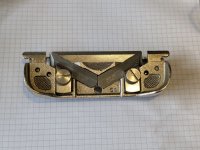

The first thing I did was take the fence and fence-mounting-screws off and lay it flat on a piece of paper. I could then draw round it with a pencil, marking a couple of (measured with calipers) dimensions that seemed useful:

Having taken a photograph of that sketch, I imported it into CAD and drew around it, adding some more dimensions and generally enlarging everything very slightly (as I want the tool to be a loose fit in its pocket):

That shape got extruded to the measured thickness (including the flat bit of the fence):

A bit was cut-out to make it a more representative shape (based on simple caliper measurements and some 3D-printed radius gauges):

The fence and fence screws got added, with the screw heads over-size and the fence much thicker than in reality to allow it to be left in a range of positions:

I then created a new block, starting a bit below the bottom of the model of the plane and coming up to an arbitrary position that looked about right:

The plane got subtracted from the new block:

There's no way that screw is ever going to get down to its pocket, so we extend the pocket up to make it into a slot:

A couple of countersunk holes were added for wall-mounting screws (with holes in the outside to allow screwdriver access):

There's a lot of excess material at the front left, so a fillet (round-over) finishes it off:

That's it done and ready to print. What looks like a fairly complex shape is created in very few steps (the whole model took me about 10 minutes in total).


 I make do with a. collection of old 'baccy tins and muzak of any sort got kicked into the long grass years ago - Rob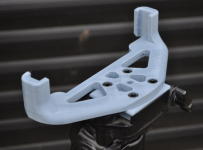







 ile of shavings